


Get Pocket - View List missing

Hi All, I use Get Pocket - a lot! Before the last couple updates the normal bookmark icon - would click on that and there would be a link to Get Pocket list. That has now disappeared. The only way I can find to see the list, is click on the "save to pocket" icon, whereby it then saves the page I am on, although I don't want to save the page, and it also has a link to view the list. So have to click on that, then delete the page just saved. All so ridiculous. I must be missing something here. The update before this, was the same and I reverted back to an older version of Firefox. Thought would try this latest update, but no ... the pocket list link inside the bookmarks icon is not there.
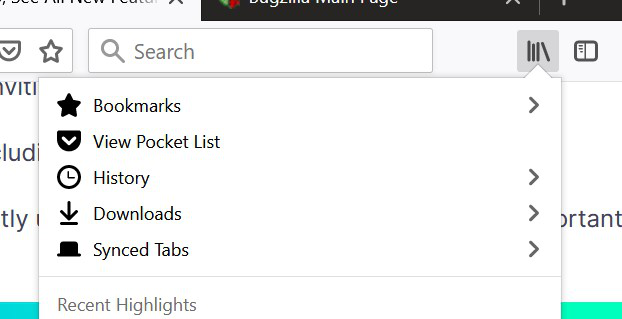
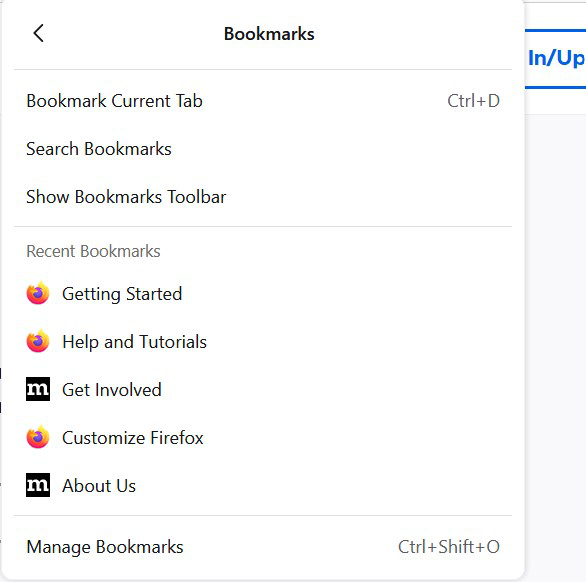
How can I get to view pocket list without having to first save the page I am on, then delete it? What am I missing. I attach three images. One of how I used to use the Get Pocket list .. i.e. using the bookmark icon. Then what the book mark icon shows now .. no pocket list ... and the only way I have found to view the list, but saving a page first :) ..... Thanks for any advice.

Soluție aleasă
Hi
You may want to try an add-on such as:
https://addons.mozilla.org/en-GB/firefox/addon/view-pocket-list/
(This is not an official Mozilla product and other similar add-ons may exist - full disclosure: I made this one.)
Citește răspunsul în context 👍 1Toate răspunsurile (2)
Soluție aleasă
Hi
You may want to try an add-on such as:
https://addons.mozilla.org/en-GB/firefox/addon/view-pocket-list/
(This is not an official Mozilla product and other similar add-ons may exist - full disclosure: I made this one.)
Brilliant! Solved the problem. Thank you so much :):) Happy bunny again :)
Edited to add "well done on the add-on!". :)
Modificat la de DiCat F