


COPY THE QUANTITY OF OCCURRENCES FROM CTRL + F

Hi!
Is it possible that the user can copy the text where the number of occurrences of words found in CTRL + F appears?
On a daily basis, I look up many words on certain sites, and I would like to register the number of results from each site more quickly. Currently I do the search and manually record the amount of words found, is it possible that I can COPY that text that indicates how many occurrences there are on the page?
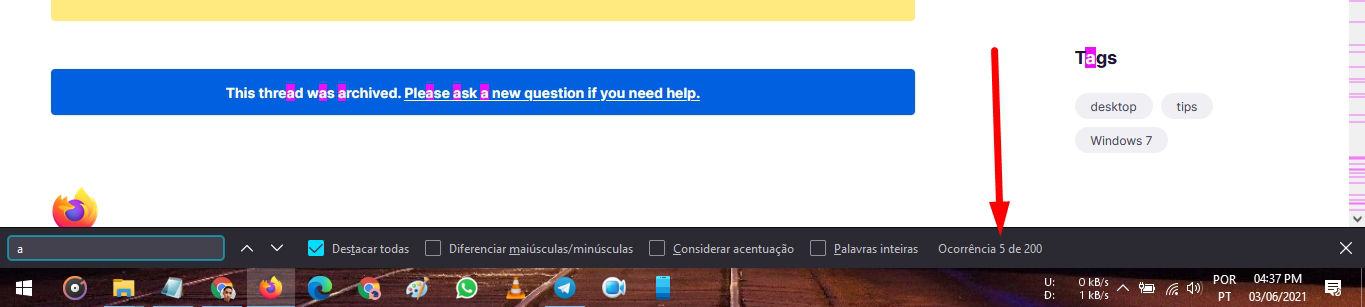
Example: in the screenshot I left attached I looked for the letter "a" inside the site I was browsing, and the result was "Occurrence 5 of 200", when trying to click 3 times on the text, it is not possible to select it to put in the copy (CTRL + C). What I need is to COPY this text that appears there to the clipboard.
I installed some extensions, two of them allow copying the text of the number of occurrences, but none of them find the same amount of words as the native Firefox search (Firefox finds many more words). Can someone help me?
Toate răspunsurile (2)
Hi
Thank you for your question. I am sorry but I do not believe that you can text copy the element that you mention.
You can possibly get this value by running code in the Browser Console (not the Web Console.
window.document.querySelector(".findbar-find-fast.found-matches").value;
To enable the command line in the Console:
- select "Enable browser chrome and add-on debugging toolboxes" in the Web Developer Tools settings (F1).
- https://developer.mozilla.org/en-US/docs/Tools/Settings