


How do i get rid of the suggested sites when I click on the search bar?
I want to know if there is a way of getting rid of the suggested sites, such as facebook, reddit, twitter etc when i click on the search bar. Is there a way of customizing what i see?
Soluție aleasă
When you first click in the bar, before you type any text for Firefox to match, the drop-down shows your first 8-10 Top Sites from the built-in Firefox Home / new tab page.
You can edit (delete, add, rearrange) your top sites on either of those pages (about:home or about:newtab). More info in this article: Customize your Firefox New Tab page.
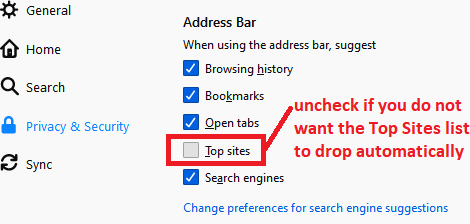
Or if you don't want them in the drop-down at all, turn them off on the Preferences page, Privacy & Security panel, Address bar section:

Does that help?
Citește răspunsul în context 👍 1Toate răspunsurile (2)
Soluție aleasă
When you first click in the bar, before you type any text for Firefox to match, the drop-down shows your first 8-10 Top Sites from the built-in Firefox Home / new tab page.
You can edit (delete, add, rearrange) your top sites on either of those pages (about:home or about:newtab). More info in this article: Customize your Firefox New Tab page.
Or if you don't want them in the drop-down at all, turn them off on the Preferences page, Privacy & Security panel, Address bar section:
Does that help?
thank you so much!! i guess i looked everywhere in the preferences except for there.