

Firul de discuție a fost arhivat.
Adresează o întrebare nouă dacă ai nevoie de ajutor.

Arhivate
I adjusted the settings in UserContent.css to make Quote Colors more compatible with dark mode but when I reply to a message the original blue overrides it. Why
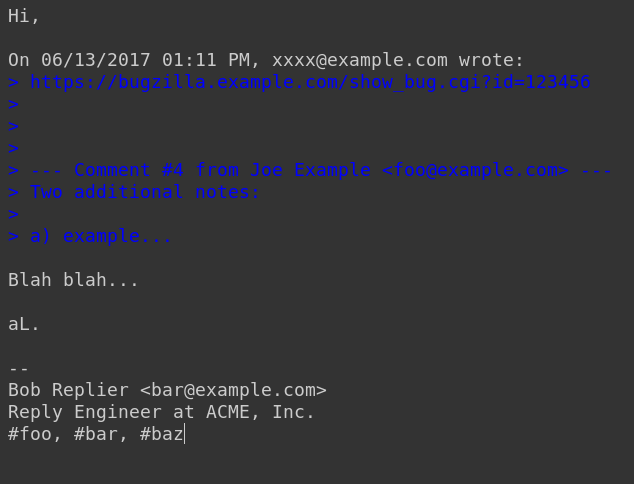
I adjusted the settings in UserContent.css to make Quote Colors more compatible with dark mode and my OLED background on Thunderbird. However, when I reply to a message, the original text which is quoted in dark blue reappears (as seen below) and overrides my settings making it unreadable. Are there any fixes for this?
I adjusted the settings in UserContent.css to make Quote Colors more compatible with dark mode and my OLED background on Thunderbird. However, when I reply to a message, the original text which is quoted in dark blue reappears (as seen below) and overrides my settings making it unreadable. Are there any fixes for this?
Toate răspunsurile (1)
I have a section in my userContent.css for changing the displayed color of the text and background for quoted plain text, in addition for quoted html content:
/* Quoted text colour for plain text */
span[_moz_quote="true"] {
  color: navy !important;
  background-color: mistyrose !important;
}
pre[_moz_quote="true"] {
  color: navy !important;
  background-color: mistyrose !important;
}
https://unix.stackexchange.com/questions/562721/thunderbird-68-css-to-change-quote-colours
See if you can choose colors that are compatible with dark mode.