


i moved my profile but bookmarks and addons do not migrate. why?

I used profile manager and copied my profile (C drive) to a different directory (D). Profile even has same name. And is same size. Yet all bookmarks and add ons are gone. They remain in original C drive profile and that works fine if I default to it. But if I make the D Drive profile the default it looks like a new profile with no existing bookmarks/add ons. Why doesn't this data move across to?
Soluție aleasă
Note that the OP wrote: But if I make the D Drive profile the default it looks like a new profile with no existing bookmarks/add ons
Did you try to copy only selected files to that profile on the D-dive or possibly rename the profile on the C-drive to make it impossible to access this profile ?
Even if the profile has the same name there are probably still files with an absolute path that reference to the original profile on the C-dive.
Citește răspunsul în context 👍 1Toate răspunsurile (3)
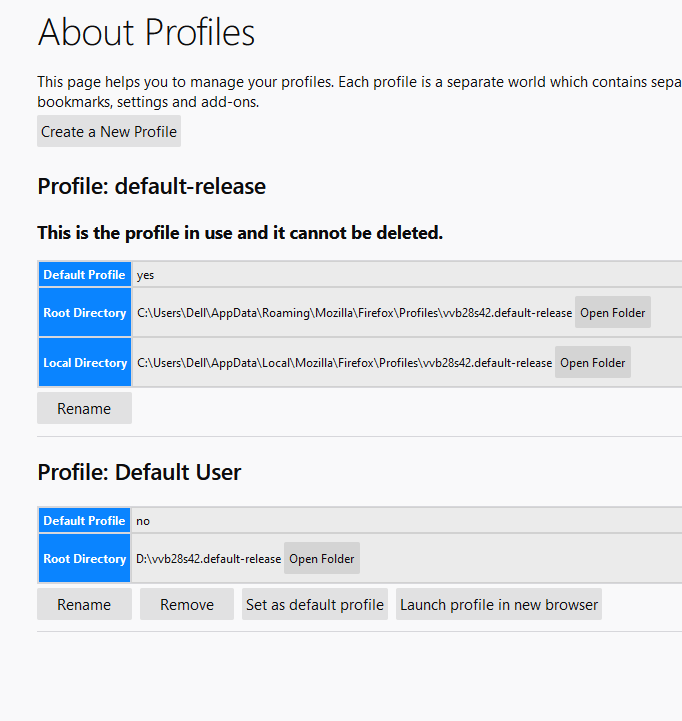
Based on the screenshot that you've posted, it looks like you are not currently using the profile folder that you have moved to your D: drive. You appear to be using the default blank profile that Firefox creates.
Try pressing the Launch profile in new browser button and see if your data is in there. If it is, you need to set that as the new default profile.
Hope this helps.
Soluție aleasă
Note that the OP wrote: But if I make the D Drive profile the default it looks like a new profile with no existing bookmarks/add ons
Did you try to copy only selected files to that profile on the D-dive or possibly rename the profile on the C-drive to make it impossible to access this profile ?
Even if the profile has the same name there are probably still files with an absolute path that reference to the original profile on the C-dive.
Thanks for your comments. I can now see that I had to copy the old location files (not folder) and paste onto the new location files. All good now.