


Why Inbox nested subfolders?

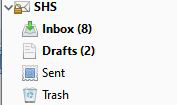
I just created a new IMAP account. Unlike the other IMAP account (see image 1) I have the new one has nested subfolder (see image 2).
Can I change it to remove nested subfolder or is this a property set by the email server?

Toate răspunsurile (5)
Should read
Unlike the other IMAP account (see image 2) I have the new one has nested subfolder (see image 1 & 3).
This might be fixed by opening Tools/Account Settings, Server Settings for the account, Advanced..., and changing the 'IMAP Server directory'. For gmail accounts, you would set this to [Gmail].
I see in the other IMAP accounts the 'IMAP Server directory' empty
However, I see that "Personal namespace" is set to "" in the non-problemtatic one whereas the in the problematic account it is set to "INBOX."
Should I set the "Personal namespace" to ""?
You can try it, but review the 4th paragraph here:
http://kb.mozillazine.org/IMAP:_advanced_account_configuration
Thanks - I will give it a read. Not sure I understand some of it