Is there a way to clear cookies when browser is closed and still keep logged in websites like youtube, facebook, twiter...?

I love the ability to see and manage each cookie that is stored while browsing. But every time I close Firefox I get automatically logged out from sites such as facebook, youtube, twiter... I've been trying out changing the settings and figured that I have to choose to either delete cookies and get automatically logged out or keep my sessions logged but not erasing cookies whenever I close Firefox.
My question is, is there a way to keep erasing cookies but keep the ones that make me stay logged in those websites?
Toate răspunsurile (3)

Your ‘logged-in’ status is stored in special cookies. If the cookie is removed, you are logged out.
Type about:preferences#privacy<enter> in the address bar. The button next to History, select Use Custom Settings.
At the bottom of the page, turn on Clear History When Firefox Closes. At the far right, press the Settings button. Turn on ONLY Cache and Form And Search History leaving the others off.
Note: Active Logins are the special cookies.
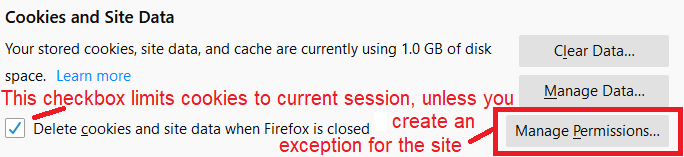
You need to use "Delete cookies and site data when Firefox is closed" to let cookies expire automatically in case you want to keep cookies with an allow exception. If you use "Clear history when Firefox closes" then all cookies are cleared regardless of an exception.
- clearing "Site Preferences" clears exceptions for cookies, images, pop-up windows, and software installation and exception for password and other website specific data
- clearing "Cookies" will remove all selected cookies including cookies with an Allow exception you may want to keep
Modificat la de cor-el
Here's a picture to go with the first part of cor-el's reply: