


Thunderbird: cannot find any .mbox files

Thunderbird v52.9.1 I have been looking for my .mbox files and have found none. I have three different email addresses (accounts) in a single profile.
I use my own basic path to ..../Profiles/.........
- = characters I think I should not be divulging
In path ...../Profiles/*****.default/Imapmail/Imap.****.de I see an Inbox.sbd & many .msf file corresponding to folders and subfolders (.sbd files).
In path ...../Profiles/*****.default/Mail/Local Folders I see two .msf files corresponding to folders.
In path ...../Profiles/*****.default/Mail/****.de I see an Inbox.sbd & many .msf file corresponding to folders and subfolders (.sbd files).
Are the .msf files where the e-mails are?
I need this information to find an email where FSecure virus scan has told me there is a generic Trojan that it will automatically deal with. (Most likely a false alarm but I want to remove it.)
Soluție aleasă
Many thanks for your help.
Toate răspunsurile (4)
Note: The following did not display correctly.
'******' = characters I think I should not be divulging
Helpful as I now know where the actual emails are but.....
In 2 of my paths the number of .msf files matches the number of files with no extension.
In the 3rd there are more .msf files than no extension files. Difference is 10. I presume Archive, Archive-1 (has this been deleted at some time or is it sub directory related), Drafts, Junk, Sent, Templates & Trash do not need a no extension file, that's 7 files different. There are 3 .msf files that I do not see any no extension files. These files (folders) lacking a no extension file are fully active in Thunderbird happily receiving mails as they come in.
FSecure indicates no quarantine files.
I also notice a couple of .msf files with greater size than the no extension files. Again, these folders are fully active in Thunderbird.
What may have cause the .msf files / no extension files mismatch? Is something corrupt?
Just to be clear, as you mention mbox files which I do not find.
The no extension files are the equivalent of mbox files?
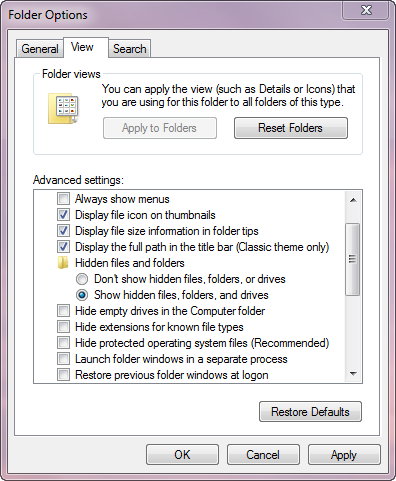
I am setup to see ll file extensions. See Image.
Soluție aleasă
Many thanks for your help.