


I want to be able to change file names when downloading documents

Firefox does not give me the option to "save as" when downloading documents. Always just downloads to download folder and whatever name that comes with the document. Most times "document", "statement" etc.
Soluție aleasă
jecsparky said
Ok I have it figured out. You have two choices. “ save files to” and “always ask”. I needed to have the always ask checked in the options. Thanks for steering me in the right direction.
If this answer helped you, please vote ,so the community can get help from helpful answers.
Citește răspunsul în context 👍 0Toate răspunsurile (5)

Hi, open the 3-bar menu > Options (General) > Files & Applications > Downloads.
If your question is resolved by this or another answer, please take a minute to let us know. Thank you!
That lets you save files to a location or always ask. Where does it let me rename the file?

jecsparky said
That lets you save files to a location or always ask. Where does it let me rename the file?
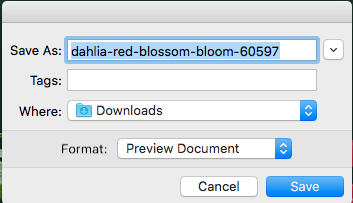
You can rename the file in Save As dialog box .
Ok I have it figured out. You have two choices. “ save files to” and “always ask”. I needed to have the always ask checked in the options. Thanks for steering me in the right direction.
Soluție aleasă
jecsparky said
Ok I have it figured out. You have two choices. “ save files to” and “always ask”. I needed to have the always ask checked in the options. Thanks for steering me in the right direction.
If this answer helped you, please vote ,so the community can get help from helpful answers.