


Windows 10 reached EOS (end of support) on October 14, 2025. If you are on Windows 10, see this article.

Caută ajutor

Atenție la excrocheriile de asistență. Noi nu îți vom cere niciodată să suni sau să trimiți vreun SMS la vreun număr de telefon sau să dai informații personale. Te rugăm să raportezi activitățile suspecte folosind opțiunea „Raportează un abuz”.

Află mai multe
Arhivate

Can't edit account settings

BarryN răspuns
BarryN

Can't edit account settings (not adding an account)

Running Thunderbird 52.5.2 on OS X El Capitan

When I try to access the account settings, I am hitting the old "Account with this name already exists" bug. I get the dialog no matter which of the tabs in the panel I click on. This issue arises in the context of trying to run down an issue with outbound email. I am getting a login to server.outbound.att.net failed enter new password dialog. When I enter the password, I am still getting the login failure. With what should be the same account settings, there is no problem either receiving or sending email using Apple Mail.

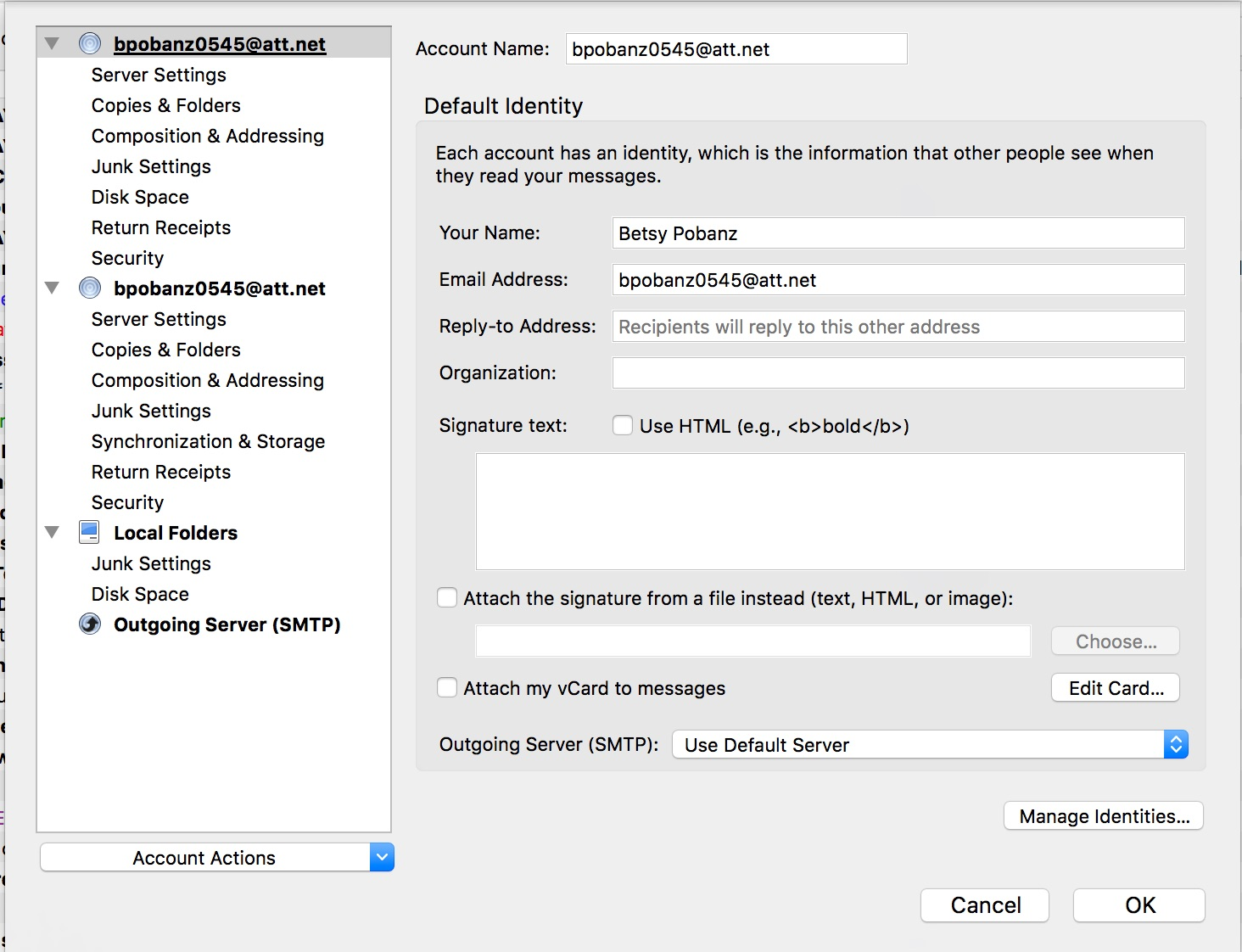
After reviewing prior threads dealing with the Account Wizard bug, I am attaching screenshots of the account settings dialog box and the mail and news accounts section of the help -> troubleshooting information.

From the config editor, I get the following:

mail.accountmanager.accounts = account1, account5, account6 mail.account.account6.identities = id1 mail.account.account5.identities = id3 mail.account.account1.server = server1 mail.account.account5.server = server2 mail.account.account6.server = server3 mail.identity.id1.usermail = bpobanz0545@att.net mail.identity.id3.usermail = bpobanz0545@att.net mail.server.server1.directory = /Users/betsy/Library/Thunderbird/Profiles/opsrqa5y.default/Mail/Local Folders/ mail.server.server1.hostname = Local Folders mail.server.server1.name = Local Folders mail.server.server1.directory-rel = [ProfD]Mail/Local Folders mail.server.server2.directory = /Users/betsy/Library/Thunderbird/Profiles/opsrqa5y.default/Mail/inbound.att-2.net mail.server.server2.hostname = inbound.att.net mail.server.server2.name = bpobanz0545@att.net mail.server.server2.port = 995 mail.server.server2.directory-rel = [ProfD]Mail/inbound.att-2.net mail.server.server2.type = pop3 mail.server.server3.directory = /Users/betsy/Library/Thunderbird/Profiles/opsrqa5y.default/ImapMail/inbound.att-2.net mail.server.server3.hostname = inbound.att.net mail.server.server3.name = bpobanz0545@att.net mail.server.server3.port = 993 mail.server.server3.directory-rel = [ProfD]ImapMail/inbound.att.net mail.server.server3.type = imap

Can't edit account settings (not adding an account) Running Thunderbird 52.5.2 on OS X El Capitan When I try to access the account settings, I am hitting the old "Account with this name already exists" bug. I get the dialog no matter which of the tabs in the panel I click on. This issue arises in the context of trying to run down an issue with outbound email. I am getting a login to server.outbound.att.net failed enter new password dialog. When I enter the password, I am still getting the login failure. With what should be the same account settings, there is no problem either receiving or sending email using Apple Mail. After reviewing prior threads dealing with the Account Wizard bug, I am attaching screenshots of the account settings dialog box and the mail and news accounts section of the help -> troubleshooting information. From the config editor, I get the following: mail.accountmanager.accounts = account1, account5, account6 mail.account.account6.identities = id1 mail.account.account5.identities = id3 mail.account.account1.server = server1 mail.account.account5.server = server2 mail.account.account6.server = server3 mail.identity.id1.usermail = bpobanz0545@att.net mail.identity.id3.usermail = bpobanz0545@att.net mail.server.server1.directory = /Users/betsy/Library/Thunderbird/Profiles/opsrqa5y.default/Mail/Local Folders/ mail.server.server1.hostname = Local Folders mail.server.server1.name = Local Folders mail.server.server1.directory-rel = [ProfD]Mail/Local Folders mail.server.server2.directory = /Users/betsy/Library/Thunderbird/Profiles/opsrqa5y.default/Mail/inbound.att-2.net mail.server.server2.hostname = inbound.att.net mail.server.server2.name = bpobanz0545@att.net mail.server.server2.port = 995 mail.server.server2.directory-rel = [ProfD]Mail/inbound.att-2.net mail.server.server2.type = pop3 mail.server.server3.directory = /Users/betsy/Library/Thunderbird/Profiles/opsrqa5y.default/ImapMail/inbound.att-2.net mail.server.server3.hostname = inbound.att.net mail.server.server3.name = bpobanz0545@att.net mail.server.server3.port = 993 mail.server.server3.directory-rel = [ProfD]ImapMail/inbound.att.net mail.server.server3.type = imap
Capturi de ecran atașate

Toate răspunsurile (2)

You have two accounts with the name "bpobanz0545@att.net". Change one of them, via the config editor.

That did the trick. Thanks for the help.