


Windows 10 reached EOS (end of support) on October 14, 2025. If you are on Windows 10, see this article.

Caută ajutor

Atenție la excrocheriile de asistență. Noi nu îți vom cere niciodată să suni sau să trimiți vreun SMS la vreun număr de telefon sau să dai informații personale. Te rugăm să raportezi activitățile suspecte folosind opțiunea „Raportează un abuz”.

Află mai multe
Arhivate

no html signature in replies/forwarding.

Matt răspuns
simonhamersley

I've had to change my pc and have installed Thunderbird again on the new one. All up and running, getting, sending emails etc. I have created an html signature block that includes text and an image. This works fine when writing an email, the text and image appearing as expected in the email. However if I do a reply or an forward in response to a received email, there is no signature block. I have been into my Account Settings via Tools -> Account Settings -> Composition and Addressing and have ticks against both 'Include signatures for replies' and 'Include signature for forwards'. Have I missed something? The is all worked fine on the other pc so at a bit of a loss.
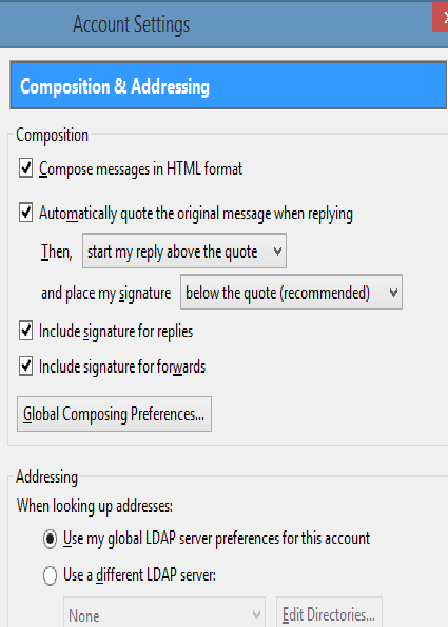
I've had to change my pc and have installed Thunderbird again on the new one. All up and running, getting, sending emails etc. I have created an html signature block that includes text and an image. This works fine when writing an email, the text and image appearing as expected in the email. However if I do a reply or an forward in response to a received email, there is no signature block. I have been into my Account Settings via Tools -> Account Settings -> Composition and Addressing and have ticks against both 'Include signatures for replies' and 'Include signature for forwards'. Have I missed something? The is all worked fine on the other pc so at a bit of a loss.
Capturi de ecran atașate

Toate răspunsurile (1)

Scroll right to the bottom of your rely and I think you will find your signature.

That is what I am reading in the options you posted. Place signature below the quote.