


I want drop down menu items to show on left of dropdown

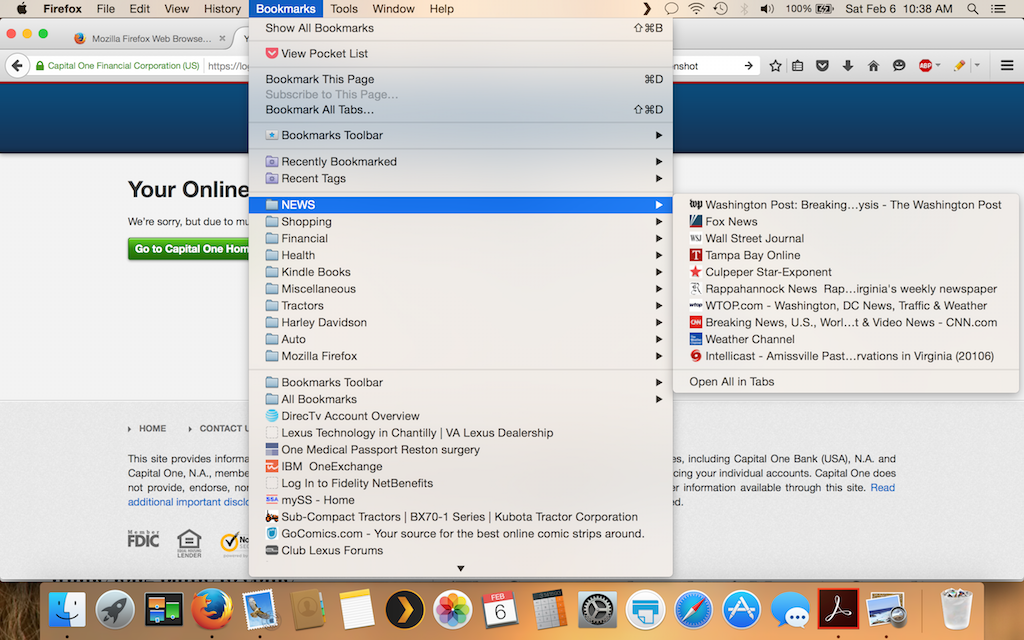
On the attached picture, the drop down items show up on the right side of the drop down list. They used to be on the left. How can I get them back to showing on the left? When I select the group NEWS, I'd like the sites listed on the left side of the word NEWS, not the right. Then, my cursor would be next to the news items.
Soluție aleasă
Firefox will always try to open a folder list to the right. Only if there isn't enough room at the right because of names in the list are very long then Firefox will open the list to the left. There is no way to affect this other than ensuring that there is at least one bookmark with a long name in each folder list.
Citește răspunsul în context 👍 0Toate răspunsurile (1)
Soluție aleasă
Firefox will always try to open a folder list to the right. Only if there isn't enough room at the right because of names in the list are very long then Firefox will open the list to the left. There is no way to affect this other than ensuring that there is at least one bookmark with a long name in each folder list.