


How to delete "View Pocket List" in drop down Bookmarks list

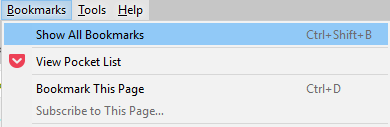
Running X-64 version 43.0.2 on Win 10 and I can't get rid of the View Pocket List from the drop down Bookmarks list. This question was asked before but is now archived. I've made the changes in about:config (browser.pocket.*) and removed the Pocket icon under the customize toolbar tool as recommended in the earlier question, but pockets are still in the drop down menu. I've restarted the browser several times and the pocket icon won't go away.
Soluție aleasă
Hi, it needs to be done in the right order, so first you will need to put the about:config change that you have made, back to default. Then right click on the Pocket button in the toolbar > Remove from Toolbar - that will remove it from bookmarks and the toolbar, but it will still be in the menu. To also remove it from there, you then need to type about:config into the address bar, press Enter, accept the warning, scroll down to browser.pocket.enabled and double click to change 'Value' from True to False, then restart Firefox.
If your question is resolved by this or another answer, please take a minute to let us know. Thank you.
Citește răspunsul în context 👍 0Toate răspunsurile (1)

Soluție aleasă
Hi, it needs to be done in the right order, so first you will need to put the about:config change that you have made, back to default. Then right click on the Pocket button in the toolbar > Remove from Toolbar - that will remove it from bookmarks and the toolbar, but it will still be in the menu. To also remove it from there, you then need to type about:config into the address bar, press Enter, accept the warning, scroll down to browser.pocket.enabled and double click to change 'Value' from True to False, then restart Firefox.
If your question is resolved by this or another answer, please take a minute to let us know. Thank you.