How to make Firefox stay on current tab, while opening new link in new tab.

I want Firefox to stay in the current tab window after clicking a link. I want the link to open in a new tab window, but not switch to it automatically.
In a nutshell, I want to be able to click on a link and have it act the same way it does when I right click and select "open link in new tab".
Modificat la de torqgal
Toate răspunsurile (4)
{ Ctrl + click } or Middle-click on hyperlinks to open that link in a new Tab.
As far as whether or not the new Tab grabs focus, that will depend on how the webpage wants that link to be opened. Some JavaScript links will just open the tab and focus on that new Tab. You would need a tab-related add-on to change that, in some cases.
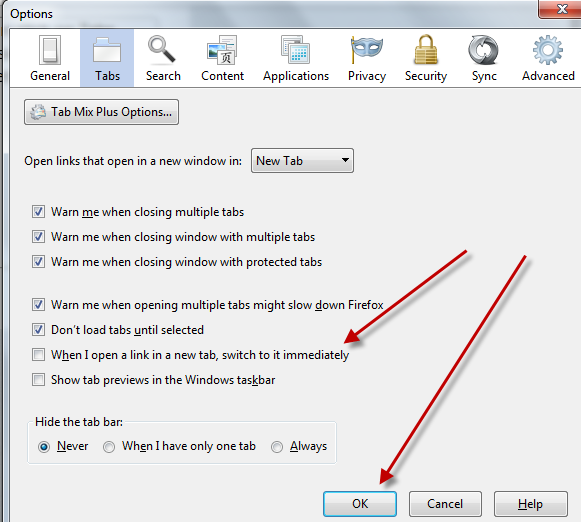
In some cases deselecting this setting in Options/Preferences > Tabs will help (hold Command and left-click).
- Firefox > Preferences > Tabs: [ ] "When I open a link in a new tab, switch to it immediately"
Note that holding Shift in addition to Command toggles this setting.

Hi, there are a couple of Add-ons that are worth trying -
Hope that will help.
Hope this helps — click on Tools, then click on Options, then click on Tabs, then be sure box next to "When I open a link in a new tab, switch to it immediately." is unchecked. Then click Okay and you are set.