


Attach signature to message template?

I have created a message template and saved it in the templates folder. If I want to use this template I click on it, fill in the correct email address and click the "Send" button. However, my signature is not attached when using a message template.
How do I configure Thunderbird, so my signature is attached when using a message template?
Toate răspunsurile (4)

christ1 said
http://kb.mozillazine.org/Signatures_(Thunderbird)
The page has no information on how to solve my problem.
You do not mention whether the saved Template email has the signature before you use it.
If you created the email and saved as Template and then created the signature afterwards, the saved template will not have one attached because that is how you created it to look.
You have two options:
Either: Open a new Write message, which will have the signature auto inserted and recreate the Template email and save as template.
OR: Download this addon.
Then when you open a template email that does not have a signature or you want to change the signature to use another html signature file, you can use the addon - signature switch to change or add a signature of choice.
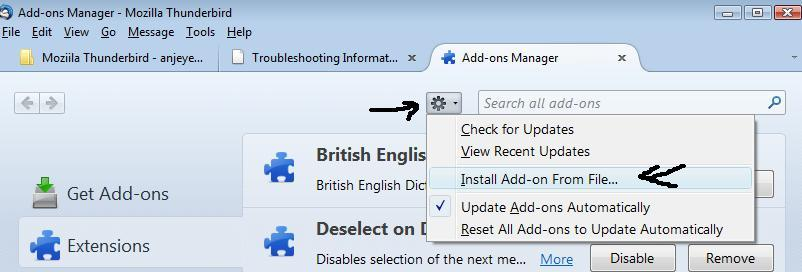
Download addon to desktop or downloads file. In Thunderbird
- Tools > addons OR Menu icon > addons
- click on gear wheel icon and select 'Install addon from file'
- You might need to restart Thunderbird.
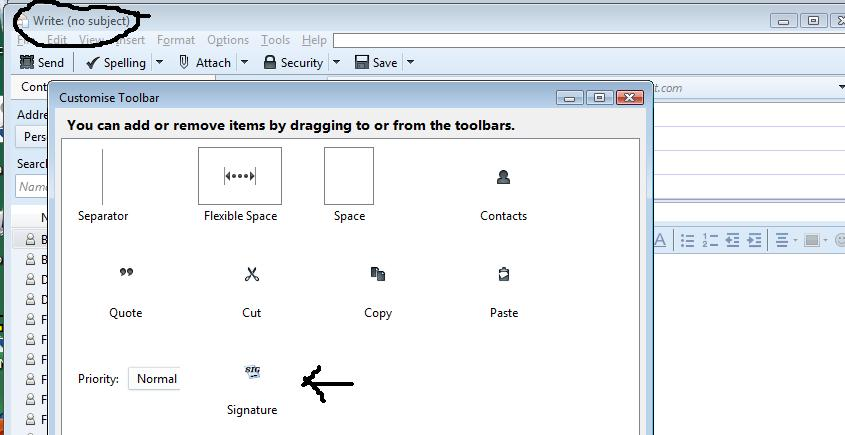
Then you can add the 'signature switch' icon to the 'Write' window 'Composition Toolbar' so it is easy to select. In new Write message window View > Toolbars > select: Customise Drag 'Signature' icon onto the 'Composition toolbar' next to where it says 'Save' See images to assist.
To add saved html signature files to Signature Switch: click on the Signature switch icon and select 'Options'
Modificat la de Toad-Hall