


Windows 10 reached EOS (end of support) on October 14, 2025. If you are on Windows 10, see this article.

Caută ajutor

Atenție la excrocheriile de asistență. Noi nu îți vom cere niciodată să suni sau să trimiți vreun SMS la vreun număr de telefon sau să dai informații personale. Te rugăm să raportezi activitățile suspecte folosind opțiunea „Raportează un abuz”.

Află mai multe

I don't want Firefox to update.

  • 1 răspuns
  • 1 are această problemă
  • 60 de vizualizări
  • Ultimul răspuns dat de I.T_guy

I installed FF 28. During the installation, I disabled the suto-updater. At first run, I dsiabled it AGAIN in the config. And still, it auto-updated to 30.

So, I uninstalled and reinstalled 28. And AGAIN it's updated automatically.

I don't care about ESR. I don't want to update to the new graphical style. I don't care if 28 has exploits. EVERY PROGRAM HAS HOLES AND CAN BE EXPLOITED!

So, I'd be grateful if anyone could explain to me why the program updated even after I set it to NOT do it. Twice.

I installed FF 28. During the installation, I disabled the suto-updater. At first run, I dsiabled it AGAIN in the config. And still, it auto-updated to 30. So, I uninstalled and reinstalled 28. And AGAIN it's updated automatically. I don't care about ESR. I don't want to update to the new graphical style. I don't care if 28 has exploits. EVERY PROGRAM HAS HOLES AND CAN BE EXPLOITED! So, I'd be grateful if anyone could explain to me why the program updated even after I set it to NOT do it. Twice.

Toate răspunsurile (1)

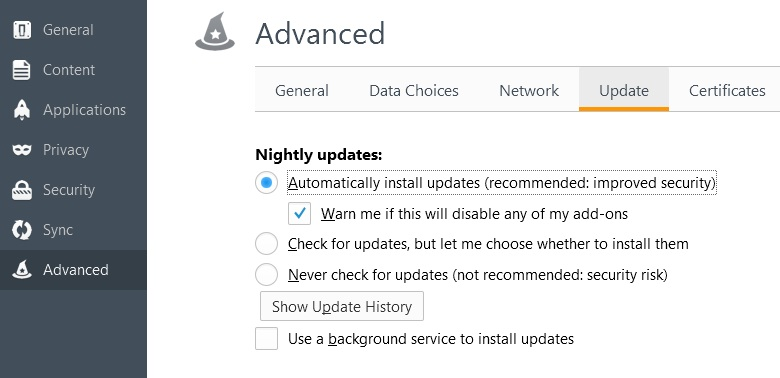
Please do the following

Go to your "Options" then under "Advance" tab you will find at the top a tab "Update" there you will find all the options.

If you turn it off there and it doesn't want to work then i suggest looking for viruses.
Modificat la de I.T_guy