


How to display different windows beside each other not on top of each other at bottom task bar

When I open a new Firefox window, it stacks it on top of all the others in the task bar at the bottom. I would like them to be BESIDE each other. It used to do that. Now I have to hover over the ONLY Firefox item on the bottom task bar and read the list to find the one I want to go to. This is a waste of time and tedious.
How can I change this?
Soluție aleasă
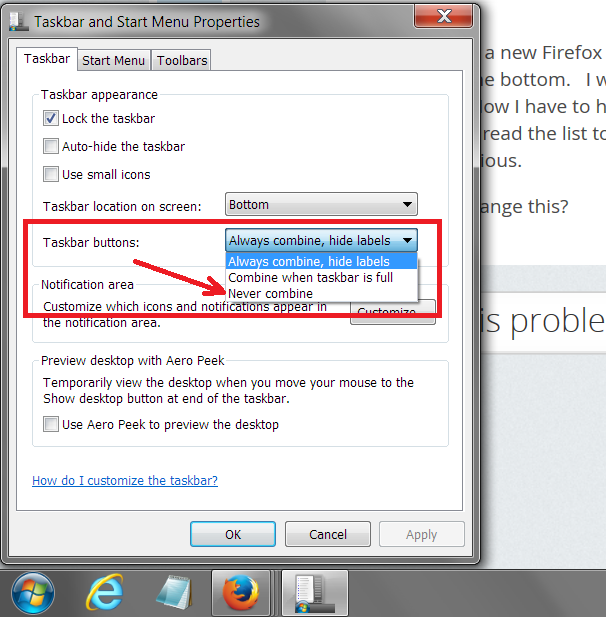
I think this is governed by your general Taskbar setting. Please see the attached screen shot. To get that dialog, right-click a blank area of the Taskbar and choose Properties.
Citește răspunsul în context 👍 0Toate răspunsurile (2)
Soluție aleasă
I think this is governed by your general Taskbar setting. Please see the attached screen shot. To get that dialog, right-click a blank area of the Taskbar and choose Properties.
Wow! Thanks! That was driving me nuts!