


why did firefox suddenly start blocking access to long accessed sites

the other day firefox started blocking sites as risky, sites that I have accessed hundreds of times (Yahoo, bank, employer, etc) and until I confirm three times it won't let me on the site.
Toate răspunsurile (3)
Date and time still set correctly in Windows?
hello, first please make sure that the date, time & timezone are set correctly on your system. if this doesn't solve the issue (or it is already set properly), a possible solution depends on different factors:
- what is the error code shown under technical details on the error page?
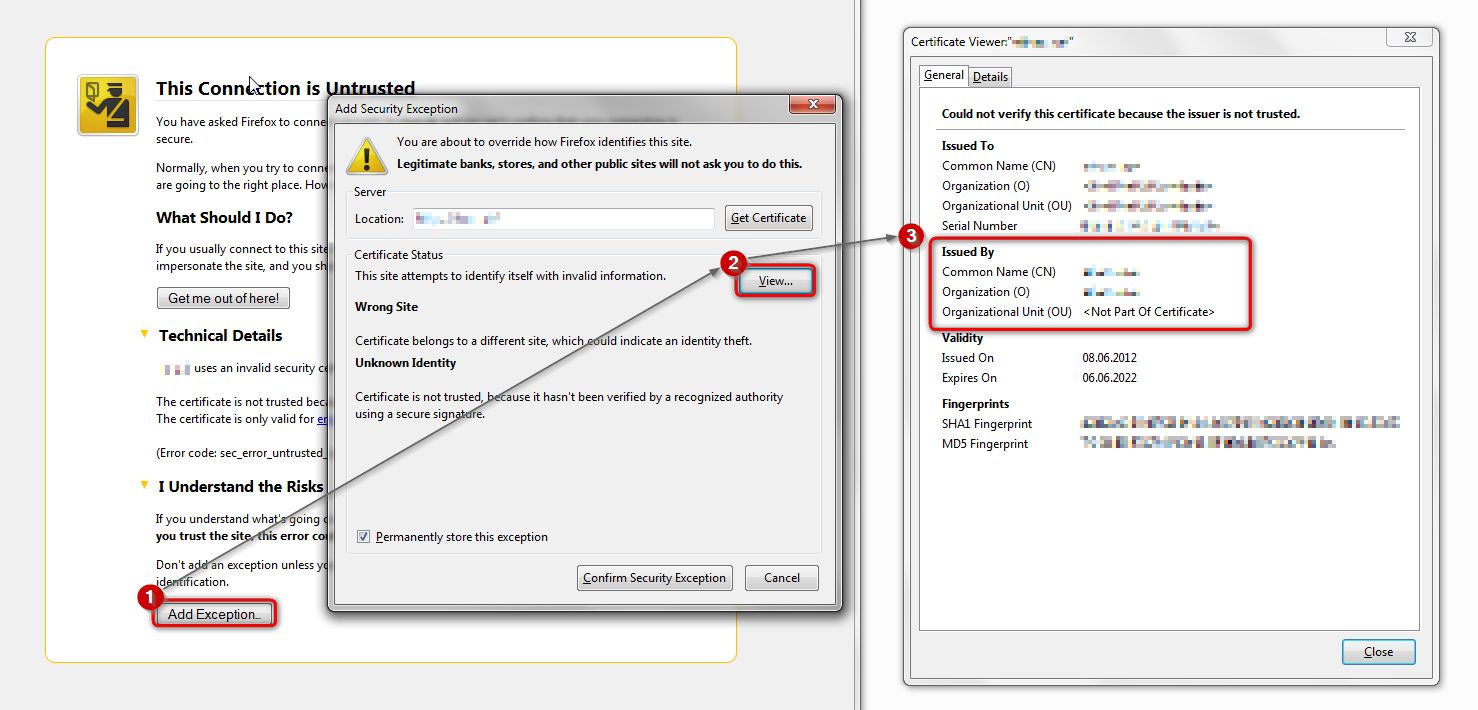
in case the error code equals sec_error_unknown_issuer, please attempt to add an exception on the bottom of the error page & inspect the certificate (see the screenshot attached for instructions):
- which issuer information does the certificate contain?
thank you!
"This Connection is Untrusted" error message appears - What to do
It is possible that your security software (firewall, anti-virus) blocks or restricts Firefox or the plugin-container process without informing you, possibly after detecting changes (update) to the Firefox program.
Remove all rules for Firefox and the plugin-container from the permissions list in the firewall and let your firewall ask again for permission to get full, unrestricted, access to internet for Firefox and the plugin-container process and the updater process.
See: