Why is Firefox launching on my system startup? Where do I disable?

I have installed the new Mac OS X Lion operating system. Suddenly, Firefox launches at startup - it is NOT in my LogIn items in my Account settings.
Solução escolhida
I found on another site that when you choose shut down there is a checkbox that says to reopen windows when logging back in. If the box is checked apps/windows that you had open when shutting down, i.e. firefox, will autolaunch when you restart your computer. I unchecked the box and firefox did not autolaunch again. Hope this helps.
Ler esta resposta 👍 4Todas as respostas (4)
Solução escolhida
I found on another site that when you choose shut down there is a checkbox that says to reopen windows when logging back in. If the box is checked apps/windows that you had open when shutting down, i.e. firefox, will autolaunch when you restart your computer. I unchecked the box and firefox did not autolaunch again. Hope this helps.
Thank you. That solved it.
I have the same problem but it doesn't solve my problem anymore. I have this problem since I use this commande line :
cd /Applications/Firefox.app/Contents/MacOS
./firefox-bin -ProfileManager
Alterado por Oxydium em
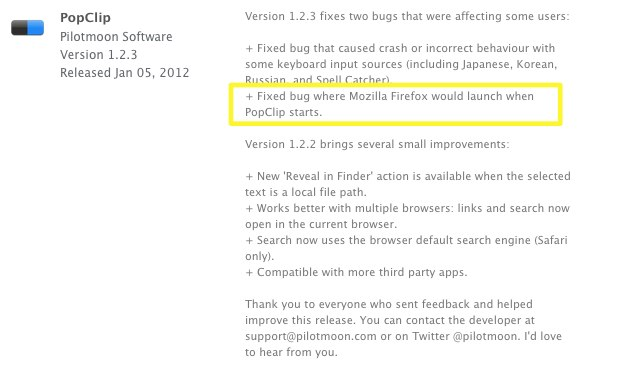
PopClip may be the culprit
I looked everywhere on my MacBook trying to find out why FireFox was launching at login, to no avail. Finally, thinking that it might be an infection of some sort, I uninstalled Firefox 9. Well today, while updating PopClip (a WONDERFUL and useful little utility), I noticed that one of the bugfixes involves issues with launching Firefox (see attached screenshot).
For more info on this, see the info on v1.2.3 at http://pilotmoon.com/popclip/. I installed this update, reinstalled Firefox, and the problem is no longer there. Yay!