


Windows 10 reached EOS (end of support) on October 14, 2025. If you are on Windows 10, see this article.

Pesquisar no site de suporte

Evite golpes de suporte. Nunca pedimos que você ligue ou envie uma mensagem de texto para um número de telefone, ou compartilhe informações pessoais. Denuncie atividades suspeitas usando a opção “Denunciar abuso”.

Saiba mais
Open

Firefox Multi-Account Containers icon not appearing in toolbar (cannot pin)

yihanzhuo4

Description: I need help with the "Firefox Multi-Account Containers" extension.

The extension is installed and shows as "enabled" in my Add-ons Manager. However, the colorful container icon does NOT appear on my toolbar, so I cannot access or use the extension at all.

What I have already tried (none worked):

· Dragging the extension icon from the puzzle menu to the toolbar · Right-clicking on the extension icon (inside the puzzle menu) to see if there is a "Pin to Toolbar" option — but the option does NOT appear at all · Restarting Firefox multiple times · Restarting my computer · Creating a new profile in about:profiles and testing the extension there — still no icon · Disabling and re-enabling the extension

The extension is installed and enabled, but without the toolbar icon, I cannot create containers or separate my Gmail accounts. I really need this feature.

I have read that this might be a bug in recent Firefox versions. Is there a known fix? Do I need to completely uninstall Firefox and reinstall it? If so, could you please guide me on how to do a clean uninstall (removing all profile folders and registry entries) and then install the latest version?

My system is Windows (older version, if that matters).

Thank you very much for any help!

Description: I need help with the "Firefox Multi-Account Containers" extension. The extension is installed and shows as "enabled" in my Add-ons Manager. However, the colorful container icon does NOT appear on my toolbar, so I cannot access or use the extension at all. What I have already tried (none worked): · Dragging the extension icon from the puzzle menu to the toolbar · Right-clicking on the extension icon (inside the puzzle menu) to see if there is a "Pin to Toolbar" option — but the option does NOT appear at all · Restarting Firefox multiple times · Restarting my computer · Creating a new profile in about:profiles and testing the extension there — still no icon · Disabling and re-enabling the extension The extension is installed and enabled, but without the toolbar icon, I cannot create containers or separate my Gmail accounts. I really need this feature. I have read that this might be a bug in recent Firefox versions. Is there a known fix? Do I need to completely uninstall Firefox and reinstall it? If so, could you please guide me on how to do a clean uninstall (removing all profile folders and registry entries) and then install the latest version? My system is Windows (older version, if that matters). Thank you very much for any help!

Todas as respostas (1)

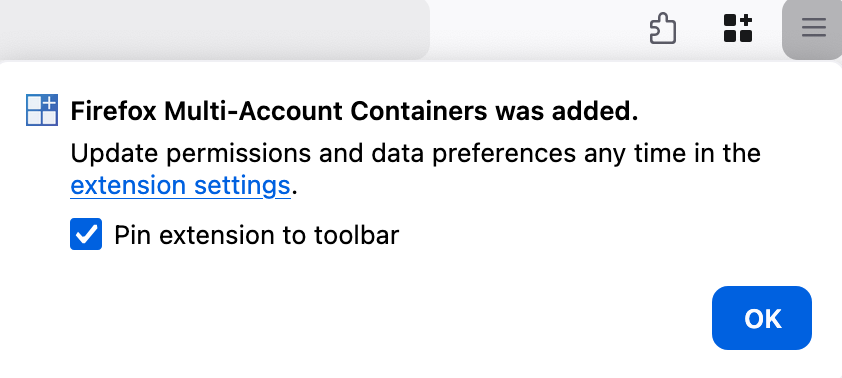
Can you remove the extension and then reinstall it at https://addons.mozilla.org/en-US/firefox/addon/multi-account-containers/ ? When you reinstall it, there should be a popup that displays a "Pin to toolbar" option. (Screenshot)
Faça uma pergunta

É necessário entrar na sua conta para responder a publicações. Faça uma nova pergunta, se ainda não tiver uma conta.