


Change to tab display in 142.0.1, taking up too much space

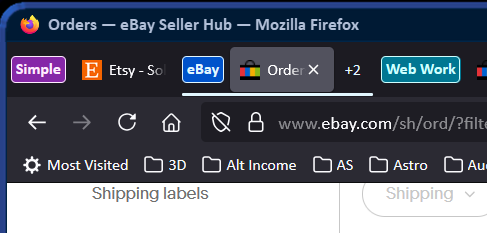
Before I updated to 142.0.1 when I had a tab group and closed it by clicking on it, all the tabs collapsed into the tab group tab and the only thing I could see was the tab group title tab. This was awesome! I started using it immediately and loved it. Since I updated the tab groups still work, but now, sometimes, when I click on the tab group tab to close the group I see the title tab, one of the tabs included in the group, and a "+2" or however many tabs are hidden. This pretty much defeats the whole idea of having the tab groups in the first place, which to me, was to hide ALL THE TABS under ONE tab to clean up my work area.
The image below shows an example. Note the "eBay" tab group is closed, and yet it shows the tab group tab (eBay), a tab in that group (eBay icon and "Order" with the X to close the tab), and then "+2" meaning there are two hidden tabs. In contrast, the "Simple" and "Web Work" tab groups are also closed and contain 4 and 9 tabs respectively, all neatly tucked under the one tag group tab for each group.
Why is this happening only on some tab groups, and only some of the time? How can I stop this from happening?
Solução escolhida
The change is to keep an active tab visible in a collapsed tab group. To completely collapse the tab group you have to select a tab outside of it.
Ler esta resposta 👍 1Todas as respostas (4)
Solução escolhida
The change is to keep an active tab visible in a collapsed tab group. To completely collapse the tab group you have to select a tab outside of it.
Thanks! That helps as I can now completely close the group. It is a pain that it takes an extra step though. Is there a way to disable that "feature"?

I really, really don't like this new tab group feature. It is very messy and I don't see the point of it. If you don't know the contents of each tab group, then you need to improve your titles. Please go back to the way it was. f I abandoned Chrome in favour of Firefox and now I'm regretting it.
Please create a new question.