


Does Firefox only sync some passwords?

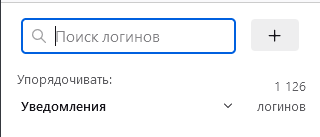
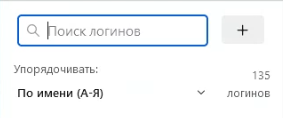
I use 1 Firefox account on 3 devices (2 PCs and a smartphone). On the first PC, the number of synchronized passwords is 1126. On the second PC - 135 (similar on a smartphone).
I pressed the "Synchronize" button many times, everything works, new tabs appear, but there are no passwords. What to do? I'm afraid that if I log out of my account on the first PC, I will lose all access forever.
I use 1 Firefox account on 3 devices (2 PCs and a smartphone).
On the first PC, the number of synchronized passwords is 1126.
On the second PC - 135 (similar on a smartphone).
I pressed the "Synchronize" button many times, everything works, new tabs appear, but there are no passwords.
What to do? I'm afraid that if I log out of my account on the first PC, I will lose all access forever.
Todas as respostas (1)
You can install the About Sync extension to check what data is stored on the Sync server via the about:sync page provided by this extension.
Close and restart Firefox to access the about:sync page added by this extension (see the about:about page for possible about pages).
Note that logins imported via CSV may not be synced.