


Can't Stop Firefox from Reloading Crashed Session
The problem is that even after I've tinkered with the about:config settings to prevent Firefox from restoring my previous session after a crash, it just won't listen! The changes I make in about:config don't seem to save, and every time Firefox crashes, it happily reloads my old tabs and windows.
Your assistance would be greatly appreciated!
OS: Arch Linux DE: Gnome 44

Solução escolhida
You can avoid it by closing Firefox before shutting down your system. Otherwise you will need to put the following in user.js file in your profile folder:
user_pref("browser.sessionstore.resume_session_once", false);
Todas as respostas (3)
We're sorry to hear that Firefox is crashing. In order to assist you better, please follow the steps below to provide us crash IDs to help us learn more about your crash.
The crash report is several pages of data. We need the report numbers to see the whole report.
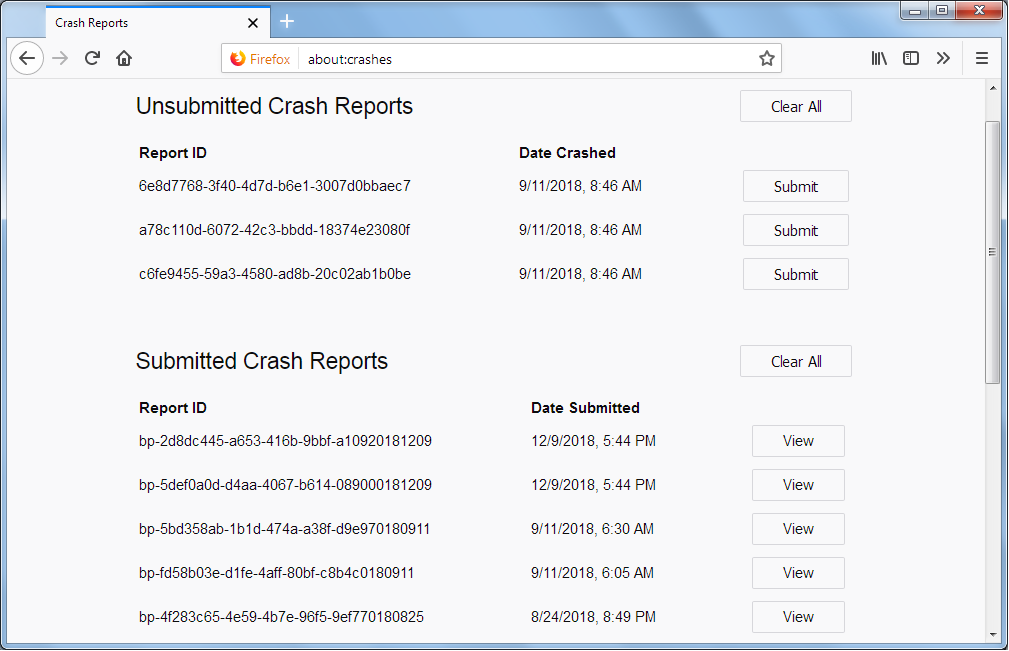
- Enter about:crashes in the Firefox address bar and press Enter. A list of Submitted/Unsubmitted Crash Reports will appear, similar to the one shown below.
- Copy the 5 most recent Submitted Report IDs that start with bp- and then go back to your forum question and paste those IDs into the "Post a Reply" box.
Note: If a recent Report ID does not start with bp- click on it to submit the report.
(Please don't take a screenshot of your crashes, just copy and paste the IDs. The below image is just an example of what your Firefox screen should look like.)
Thank you for your help!
More information and further troubleshooting steps can be found in the Troubleshoot Firefox crashes (closing or quitting unexpectedly) article.
Paul said
We're sorry to hear that Firefox is crashing. In order to assist you better, please follow the steps below to provide us crash IDs to help us learn more about your crash. The crash report is several pages of data. We need the report numbers to see the whole report.Note: If a recent Report ID does not start with bp- click on it to submit the report. (Please don't take a screenshot of your crashes, just copy and paste the IDs. The below image is just an example of what your Firefox screen should look like.)
- Enter about:crashes in the Firefox address bar and press Enter. A list of Submitted/Unsubmitted Crash Reports will appear, similar to the one shown below.
- Copy the 5 most recent Submitted Report IDs that start with bp- and then go back to your forum question and paste those IDs into the "Post a Reply" box.
Thank you for your help! More information and further troubleshooting steps can be found in the Troubleshoot Firefox crashes (closing or quitting unexpectedly) article.
Firefox does not experience crashes; rather, when I shut down my system and subsequently restart it, Firefox automatically restores my previous session.
Solução escolhida
You can avoid it by closing Firefox before shutting down your system. Otherwise you will need to put the following in user.js file in your profile folder:
user_pref("browser.sessionstore.resume_session_once", false);