


Mozilla Crashes everytime I connect to Google Meeting

I've tried Troubleshooting mode and a fresh install and nothing is stopping the crash whenever I join a Google Meeting.
MacBook Air (Retina, 13-inch, 2019) Version 12.3.1 (21E258) 1.6 GHz Dual-Core Intel Core i5 Mozilla: 102.0.1 (64-bit) My only plugins are Grammerly and Bitwarden
Please help! I'm a new user!
Todas as respostas (4)
We're sorry to hear that Firefox is crashing. In order to assist you better, please follow the steps below to provide us crash IDs to help us learn more about your crash.
The crash report is several pages of data. We need the report numbers to see the whole report.
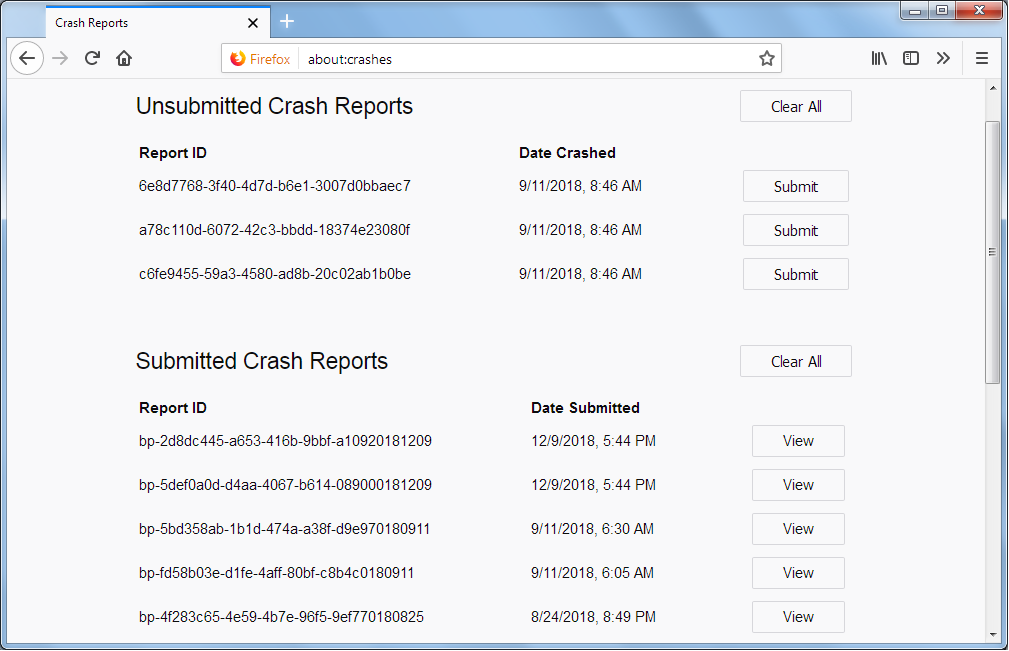
- Enter about:crashes in the Firefox address bar and press Enter. A list of Submitted/Unsubmitted Crash Reports will appear, similar to the one shown below.
- Copy the 5 most recent Submitted Report IDs that start with bp- and then go back to your forum question and paste those IDs into the "Post a Reply" box.
Note: If a recent Report ID does not start with bp- click on it to submit the report.
(Please don't take a screenshot of your crashes, just copy and paste the IDs. The below image is just an example of what your Firefox screen should look like.)
Thank you for your help!
More information and further troubleshooting steps can be found in the Troubleshoot Firefox crashes (closing or quitting unexpectedly) article.
Absolutely, please see below:
bp-fa330e5e-10f1-4506-80c4-021a90220718 bp-431d54d2-a879-4cc4-a20b-4dc1a0220718 bp-c973d641-9cf3-454f-b0c3-70b4c0220718 bp-b025ce5b-7775-498a-a959-913f90220718 bp-43f0025a-6b76-44ec-b8e3-df06c0220718
Do you have an app on your laptop called Relaycam?
Looking at those crash reports that may be the cause of the problem. Are you able to make sure that it is fully up to date?
This question has been locked because the original author has deleted their account. While you can no longer post new replies, the existing content remains available for reference.