


Print color mode disabled

When printing a page or pdf the color mode is disabled in the print dialog. Is this a known bug waiting to be fixed?
Please avoid suggestions like "use printer dialog" or "set default printing to desired setting from windows"
It is unacceptable to not be able to change color or b/w when needed or e.g. duplex mode
Thank you
PS: did change in print.printer_PRINTER-NAME.print_in_color to false with no luck anyways but even if it did work it's not easy to change every time I need different mode
Solução escolhida
changing printer defaults to B/W enables the color mode in firefox but it prints in B/W anyway. it's a driver issue as in another pc on my netowrk with PCL6 driver of same printer works like a charm
Todas as respostas (5)
Firefox reads information about your printer from the OS. Either it doesn't understand the information presented, or the printer isn't indicating that it can print in color.
Another user just mentioned that they have this issue after updating to Windows 11: https://support.mozilla.org/questions/1362487 -- perhaps you have the same printer?
Either way, this should not affect the "Save to PDF" destination; for me that one is always locked to Color.
jscher2000 said
Firefox reads information about your printer from the OS. Either it doesn't understand the information presented, or the printer isn't indicating that it can print in color. Another user just mentioned that they have this issue after updating to Windows 11: https://support.mozilla.org/questions/1362487 -- perhaps you have the same printer? Either way, this should not affect the "Save to PDF" destination; for me that one is always locked to Color.
My OS is Windows 10 pro 21H2 and Firefox is 95.0.2 64 bit. My printer is Kyocera Ecosys M5521cdw This has nothing to do with my printer. Same disable option to b/w 80mm printer same to prin to pdf. It should be enabled so i can choose color or b/w My question is why it is not
it is only enabled in XPS where in chrome it works fine
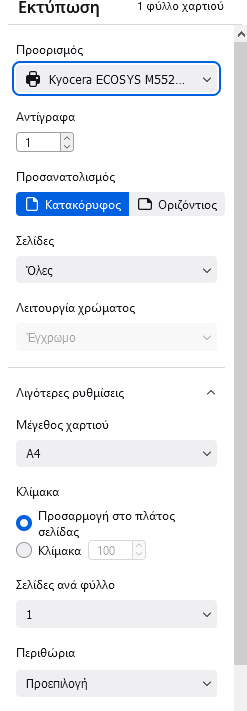
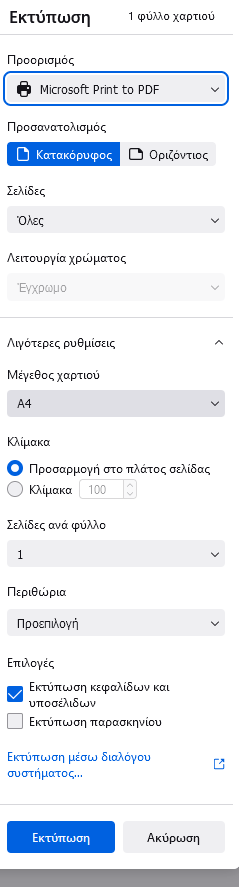

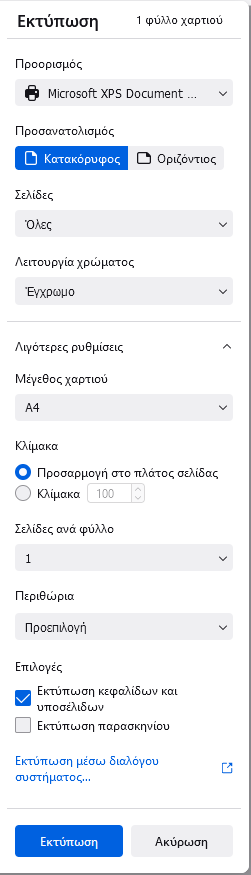

Solução escolhida
changing printer defaults to B/W enables the color mode in firefox but it prints in B/W anyway. it's a driver issue as in another pc on my netowrk with PCL6 driver of same printer works like a charm
debugitsolutions said
changing printer defaults to B/W enables the color mode in firefox but it prints in B/W anyway.
That is strange. You could file a bug about the driver, if no one has done that already.
By the way, when I referred to the "Save to PDF" printer, I meant the built-in converter:

