


Firefox does not open; if it does, it crashes after some time.

The issue started a week ago. I have the latest update of Firefox. I am using Windows 10, with satisfactory system specifications to run Firefox. I use Quick Heal Total Security. I have been using Firefox without issues since two years now. I do not use any extensions or add-ons. When I start Firefox, the following message pops up- "Firefox is already running, but is not responding. The old Firefox process must be closed to open a new window", and there are two options to either 'close firefox' or 'cancel'. I have already tried uninstalling Firefox and reinstalling multiple times. The issue comes up after a few launches. Sometimes, when I restart laptop, it might open and work fine. But when I close and re-launch Firefox, the issue pops up again.
Please help me solve the problem.
Todas as respostas (3)

In the address bar, type about:crashes<enter>. Note: If any reports do not have BP- in front of the numbers/letters, click it to submit them.
The crash report is several pages of data. We need the report numbers to see the whole report.
Using your mouse, mark the most recent 7 - 10 Submitted crash reports, and copy them. Now go to the reply box and paste them in.
Please, Do not post a screenshot ! !
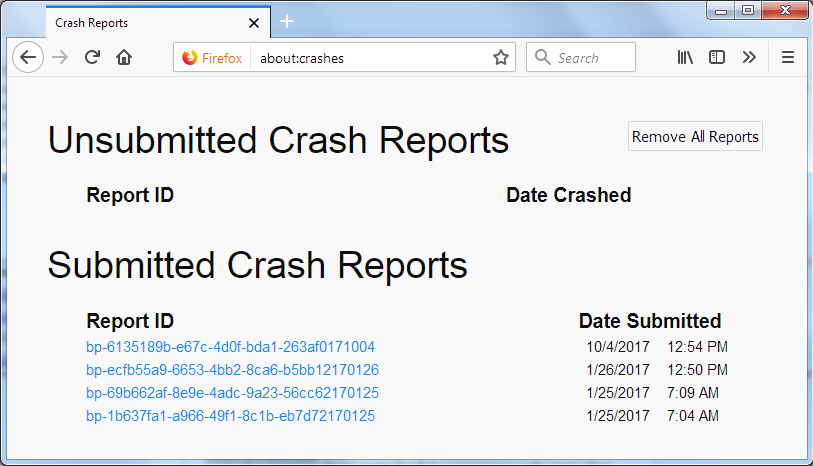
For more help on crash reports, see; https://support.mozilla.org/en-US/kb/firefox-crashes-asking-support +++++++++++++++++++++++++++ If you can't get Firefox to open, you will have to do this the hard way. https://support.mozilla.org/en-US/kb/mozillacrashreporter
Open the file browser / explorer on your computer. Note: You may have to enable Show Hidden Folders / Files. Enter this in the address bar;
Windows: %APPDATA%\Mozilla\Firefox\Crash Reports\submitted Win 7/Vista: C:\Users\<username>\AppData\Roaming\Mozilla\Firefox\Crash Reports\submitted Win XP/2000: C:\Documents and Settings\<username>\Application Data\Mozilla\Firefox\Crash Reports\submitted Win 10: Press <Windows> + R on the keyboard. A Run dialog will open. In the Run dialog, type %APPDATA%\Mozilla\Firefox\Crash Reports\submitted <Enter>
Mac OS: /Users/<username>/Library/Application Support/Firefox/Crash Reports/submitted
Linux: /home/<username>/.mozilla/firefox/Crash Reports/submitted
Copy the most Recent 5-7 File Names in the folder. Press the Reply button. Now go to the reply box and paste them in.
This question has been locked because the original author has deleted their account. While you can no longer post new replies, the existing content remains available for reference.