


Firefox China's editors are SHIT!!!
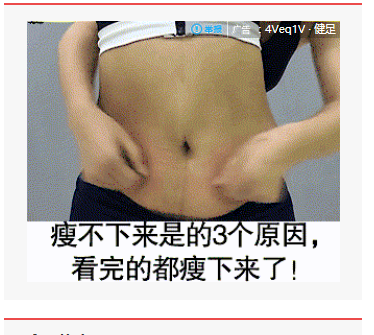
Get rid of those Stupid light bars in the Chinese firefox!!!!!! Every time when I browse the information, the page will show a fat woman constantly patting her belly, constantly patting her belly!! over and over!!! Can you stand it? !!!!!!!!!!!!
Please note that the picture I uploaded is a GIF picture!!!!!! please imagine that picture by yourself!!
Solução escolhida
First of all: your uploaded picture does not show a "fat" woman ..... (?)
If you don't want to see animated gif's, you could do this :
Type in the address bar about:config and press Enter.
(ignore the warning)
Type in the search bar and look for the preference :
image.animation_mode and set its value to none.
none - will prevent all animation and display a static image instead.
once - will run through the animation once and then stop.
normal (default) - will allow it to play repeatedly.
Then close and restart Firefox.
You could also choose to use one of these add-ons :
https://addons.mozilla.org/en-US/firefox/addon/gif-blocker/
https://addons.mozilla.org/en-US/firefox/addon/toggleanigif/
Todas as respostas (2)
Hello,
You can solve this problem by clearing cookies and site data.
- Click on menu icon.
- Click on options.
- In left pane, you will see Privacy & Security Menu, click on it.
- In this menu, you will find an option Cookies and Site data.
- Click on clear data.
If it doesn't solved your problem, then you can freely ask in Reply Section. Thanks for raising your question in Mozilla Support Forum.
Solução escolhida
First of all: your uploaded picture does not show a "fat" woman ..... (?)
If you don't want to see animated gif's, you could do this :
Type in the address bar about:config and press Enter.
(ignore the warning)
Type in the search bar and look for the preference :
image.animation_mode and set its value to none.
none - will prevent all animation and display a static image instead.
once - will run through the animation once and then stop.
normal (default) - will allow it to play repeatedly.
Then close and restart Firefox.
You could also choose to use one of these add-ons :
https://addons.mozilla.org/en-US/firefox/addon/gif-blocker/
https://addons.mozilla.org/en-US/firefox/addon/toggleanigif/