How do i change the 'Open With' settings?
Hello, today i wanted to download a song from the internet, and well, i accidentally opened it with a program i didn't want to, and i also cliked 'Always', so i can't change it now. Is there any way i can change this?
Hello, today i wanted to download a song from the internet, and well, i accidentally opened it with a program i didn't want to, and i also cliked 'Always', so i can't change it now. Is there any way i can change this?
Todas as respostas (4)
Nøkk said
Hello, today i wanted to download a song from the internet, and well, i accidentally opened it with a program i didn't want to, and i also cliked 'Always', so i can't change it now. Is there any way i can change this?
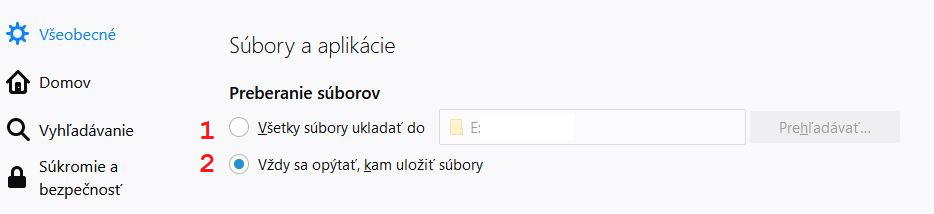
Nastavte si to v "Možnostiach". Ako prvé urobte krok číslo 1 a potom zvoľte krok 2.
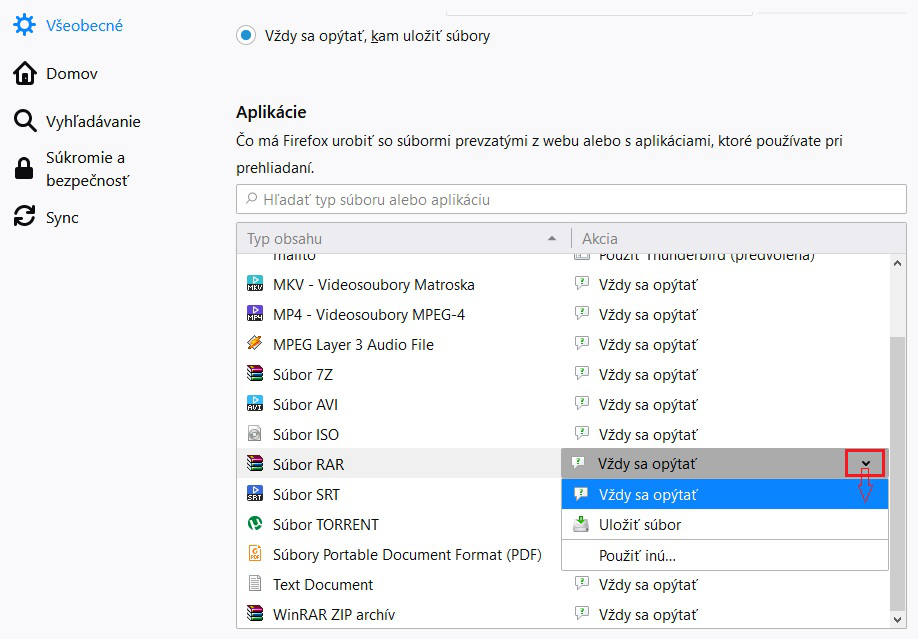
Zkusil bych to opravit přes about:preferences - Apikace (nastavit Akci).
Skúste sa pozrieť do "Nástroje -> Možnosti -> Aplikácie" ako máte nastavené jednotlivé položky, ktorých sa to týka (či tam máte "Vždy sa spýtať" albebo "Uložiť súbor").: