


Thunderbird subfolders not showing content

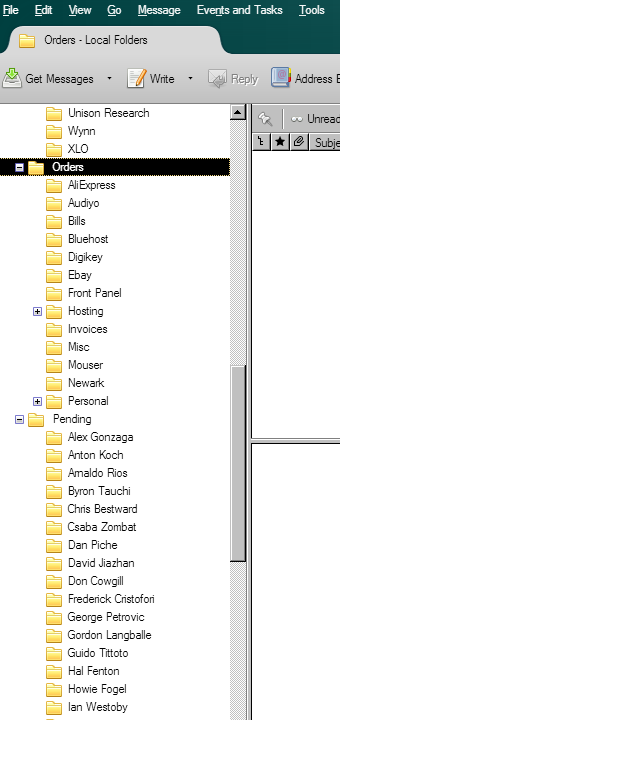
I just migrated (via mozbackup) my Thunderbird profile from an XP computer to a Windows 10 computer. I have a group of subfolders where I store archives and various emails I need visible. These subfolders are not showing up. If I go to my profile they are all there with all the emails. In the screen shot, the tree is expanded. Everything under the "-" folders is missing. I did try the cut and paste method to migrate. It didn't work at all which is why I went with mozbackup
Todas as respostas (2)
copy and paste... cut and paste is destructive to the source.
it is nt hard if you are in any way familiar with the file system.
On XP Windows key +R type %appdata%\Thunderbird. Copy all the files from the Thunderbird folder and all sub folders.
On your new windows device Windows key +R type %appdata%\Thunderbird. Replace what ever is there with your old data.
This process only works if your data is in it's profile folder. Those that manually change the location to somewhere else for mail storage in account setting have to exactly reproduce the old location on the new device. This is very difficult if the old location was in the documents and settings folders as they simply do not exist under later versions of windows. Manual updating of account settings location for each affected account is required.
Basically the more of the oringinal default locations you changed the harder it is.
Given that mozbackup is considered by it;s author to be broken and use at your own risk. I would guess it has simply not copied all the files. Especially if they are long, so the long file name exceeds 255 characters.
Sorry, I meant copy and paste.
 I had tried this several times and always the same result - missing folders. However you did give me a clue as to what happened. The path on the new computer wasn't correct, and I don't know why. However after a little effort, I'm back up and running and everything is there.
 Thanks for you help.