


Add-Ons page recognizing wrong Firefox version

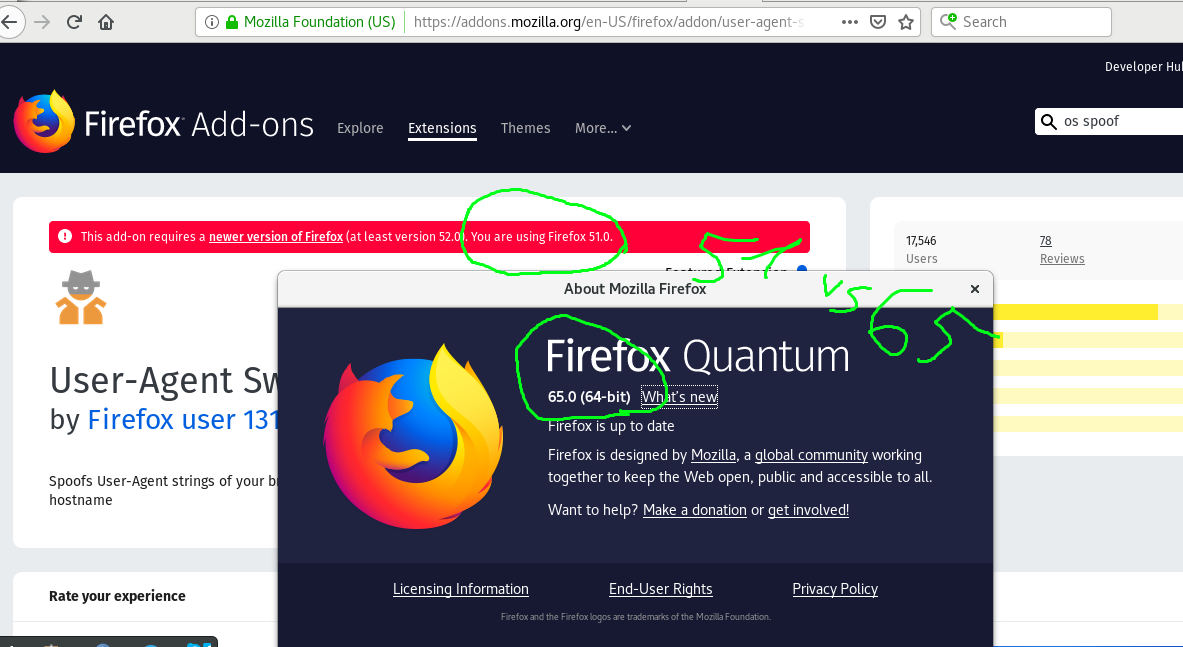
I have installed Firefox 65.0 on Debian Stretch following the instructions on this website: https://linuxconfig.org/how-to-install-latest-firefox-browser-on-debian-9-stretch-linux. When I execute "firefox --version" on my terminal I get "Mozilla Firefox 65.0", the same which is shown in "Help -> About Firefox".
However, when I try to install some add-ons I get a warning "You're using Firefox 51.0"- it seems to think that I'm still using the old version. Am I? How can I fix it?
Todas as respostas (2)
Solução escolhida
The User Agent you used to post this thread is Mozilla/5.0 (Windows NT 10.0; WOW64; rv:51.0) Gecko/20100101 Firefox/51.0
So it appears to be either from a UA related Extension you have installed or it was manually modified.
https://support.mozilla.org/en-US/kb/how-reset-default-user-agent-firefox
Alterado por James em
You're right. It was manually modified by an old add-on I had already removed a long time ago. The link you provided solved the issue, thanks.