


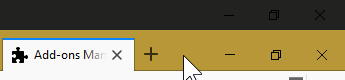
Since last Windows update the top bar is glitched due to Windows Sets

Since last Windows update the top bar is glitched due to Windows Sets, making it have two bars, the topmost bar is clickthrough and repeat maximizations create additional ghost bars. It's totally broken atm: https://i.imgur.com/0P8gfDi.png

Solução escolhida
Pkshadow said
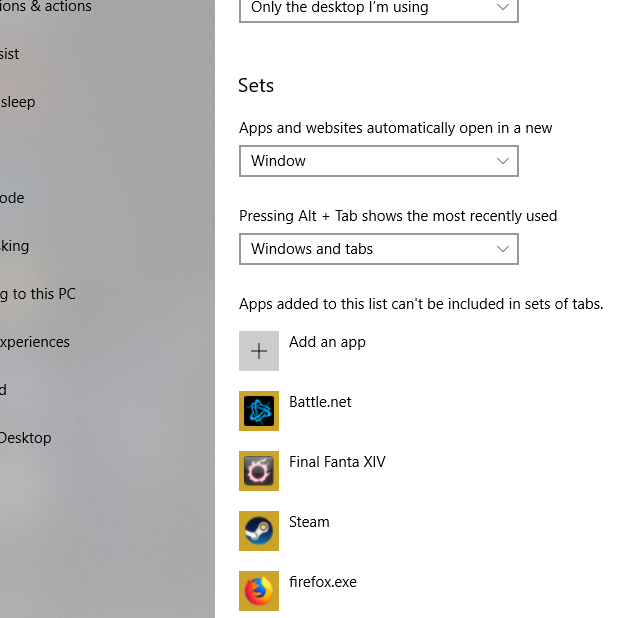
Hi, see if can figure it out from the configuration panel : So turn it off, then research how to exempt programs or how ever it works. https://www.windowscentral.com/how-disable-sets-windows-10 Please let us know if this solved your issue or if need further assistance.Nope, i don't have that option. But i had to manually add the firefox.exe and that serves as a temporary workaround.
Todas as respostas (3)
Hi, see if can figure it out from the configuration panel : So turn it off, then research how to exempt programs or how ever it works. https://www.windowscentral.com/how-disable-sets-windows-10
Please let us know if this solved your issue or if need further assistance.
Yes, compatibility with Windows Sets is not a near term project for Firefox, according to a thread on Reddit from last month.
https://www.reddit.com/r/firefox/comments/8k8lnn/windows_sets_compatibility_for_firefox/
Solução escolhida
Pkshadow said
Hi, see if can figure it out from the configuration panel : So turn it off, then research how to exempt programs or how ever it works. https://www.windowscentral.com/how-disable-sets-windows-10 Please let us know if this solved your issue or if need further assistance.Nope, i don't have that option. But i had to manually add the firefox.exe and that serves as a temporary workaround.