


The address wasn’t understood Firefox doesn’t know how to open this address, because one of the following protocols (rtsp) isn’t associated with any program or

error message: "The address wasn’t understood Firefox doesn’t know how to open this address, because one of the following protocols (rtsp) isn’t associated with any program ..."
Solução escolhida
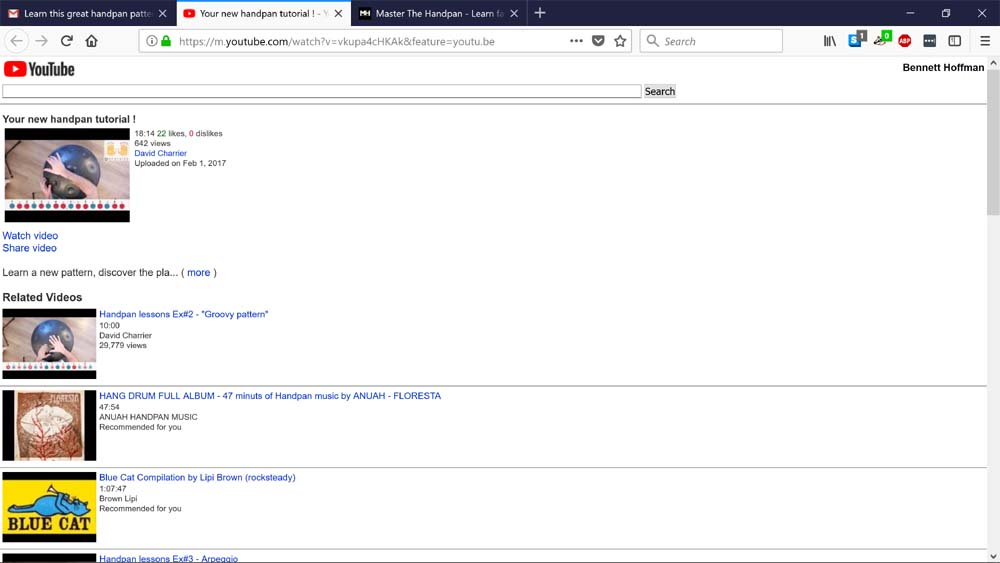
I found out what the problem was... The page that a youtube address would send me to with links (see photo posted in comment above) that didn't work, has 2 check-boxes at the very bottom:
 - mobile
 -desktop
somehow mobile had been selected and by clicking "desktop" the YouTube links on my pages now open the video. How my account got switched from desktop to mobile I don't know... but for sure it's not a Mozilla problem... and no longer mine either :) Maybe this will help someone else with this problem... thanks Pkshadow, for your efforts...
Ler esta resposta 👍 3Todas as respostas (7)
I've been using this computer and Win 10 for along time and never had a problem opening youtube before...malwarebytes says all ok, windefender also...
uninstall Firefox. Then Delete the Mozilla Firefox Folders in C:\Program Files and C:\Program Files(x86) Then restart system. Then run Windows Disk Cleanup. (Note: This should be Pinned and run Weekly, If never done below expect 10's of gig's) Then run it again and click the button that says Cleanup System Files. Note: your Firefox Profile is saved. But you should make a back up before you do :
- https://support.mozilla.org/en-US/kb/back-and-restore-information-firefox-profiles
- https://support.mozilla.org/en-US/kb/export-firefox-bookmarks-to-backup-or-transfer
Reinstall with Current Release Firefox 57.0.4 with a Full Version Installer
Please let us know if this solved your issue or if need further assistance.
I followed the instructions... but it didn't help... same problem -
when I click on a youtube link that has worked in the past, i go to a page like the one attached... and any of the blue links bring up the same error message...
I don't have this problem with Chrome... anybody else have this problem???
Alterado por gyanarthi em
I would suggest using at own risk : https://itstillworks.com/make-firefox-open-rtsp-addresses-33779.html see : https://www.google.ca/search?q=firefox+protocols+%28rtsp%29&ie=utf-8&oe=utf-8&client=firefox-b&gfe_rd=cr&dcr=0&ei=ql1UWqyHHs-BiAPjxJjQCA Are you sure you really want this protocol since it is not standard. If it is not from a reputable site I would avoid doing so as should come in normal http or https Again at own risk.
Please let us know if this solved your issue or if need further assistance.
I appreciate your reply, Pkshadow...
But, I imagine this must be a firefox bug somehow... because the links I'm trying to open are for YouTube... and when I copy the link that won't work in Firefox and paste in my Chrome browser it works fine and the youtube video comes up. I can't even get to the main youtube site with firefox... even "https://m.youtube.com/" takes me to a page like I posted above with links to videos that bring up this message:
"The address wasn’t understood. Firefox doesn’t know how to open this address, because one of the following protocols (rtsp) isn’t associated with any program or is not allowed in this context.
You might need to install other software to open this address."
No one else is having this problem??? I can just not use Firefox... and do everything via Chrome... but I Mozilla might know about this and have a fix or be working on a fix...
Alterado por gyanarthi em
Is there anything that you did that caused this by ok or click something ? Is there anything you really need besides your bookmarks from Firefox ? As can do a complete uninstall and reinstall.
Try this before go that route though : SAFE MODE
- https://support.mozilla.org/kb/Safe+Mode
- https://support.mozilla.org/kb/Troubleshooting+extensions+and+themes
In Firefox Safe mode these changes are effective:
- all extensions are disabled (about:addons)
- default theme is used (no persona)
- userChrome.css and userContent.css are ignored (chrome folder)
- default toolbar layout is used (file: localstore-safe.rdf)
- Javascript JIT compilers are disabled (prefs: javascript.options.*jit)
- hardware acceleration is disabled (Options > Advanced > General)
- plugins are not affected
- preferences are not affected
TEST and see if get the error. If still get the error : https://support.mozilla.org/en-US/kb/profiles-where-firefox-stores-user-data Make note of the folder name. You did do a Back up of Profile and of Bookmarks from previous answer I would think so go ahead with the below. Profile : Make a new one and test ...:
Make it active with no nothing in the way of Extensions.
Post back.
Alterado por Shadow110 em
Solução escolhida
I found out what the problem was... The page that a youtube address would send me to with links (see photo posted in comment above) that didn't work, has 2 check-boxes at the very bottom:
 - mobile
 -desktop
somehow mobile had been selected and by clicking "desktop" the YouTube links on my pages now open the video. How my account got switched from desktop to mobile I don't know... but for sure it's not a Mozilla problem... and no longer mine either :) Maybe this will help someone else with this problem... thanks Pkshadow, for your efforts...