


Windows 10 reached EOS (end of support) on October 14, 2025. If you are on Windows 10, see this article.

Pesquisar no site de suporte

Evite golpes de suporte. Nunca pedimos que você ligue ou envie uma mensagem de texto para um número de telefone, ou compartilhe informações pessoais. Denuncie atividades suspeitas usando a opção “Denunciar abuso”.

Saiba mais

Esta discussão foi arquivada. Faça uma nova pergunta se precisa de ajuda.

Thunderbird won't connect to hotmail account

  • 2 respostas
  • 2 têm este problema
  • 163 visualizações
  • Última resposta de Andrew S Hatton

I am not able to add hotmail account to thunderbird. I have the latest thunderbird version I have turned on pop in hotmail pop settings as explained here: https://support.mozilla.org/en-US/questions/1120891?fpa=1 In your hotmail/outlook account (web) go to settings (the "wheel" right above), click "options" and under Accounts go to POP and IMAP settings. Under POP select that apps and devices may use POP.

On this url you can enable pop: https://outlook.live.com/owa/?realm=outlook.com&path=/options/popandimap

I use the right settings but no luck adding the account:

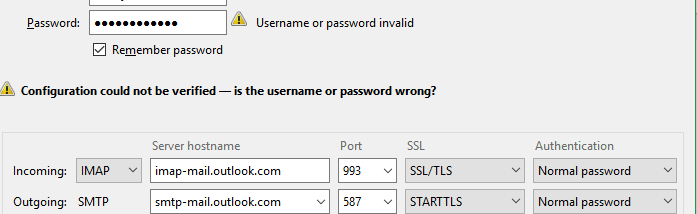
  IMAP server name imap-mail.outlook.com
   IMAP port 993
   IMAP encryption method TLS
   POP server name pop-mail.outlook.com
   POP port 995
   POP encryption method TLS
   SMTP server name smtp-mail.outlook.com
   SMTP port 587
   SMTP encryption method STARTTLS
I am not able to add hotmail account to thunderbird. I have the latest thunderbird version I have turned on pop in hotmail pop settings as explained here: https://support.mozilla.org/en-US/questions/1120891?fpa=1 In your hotmail/outlook account (web) go to settings (the "wheel" right above), click "options" and under Accounts go to POP and IMAP settings. Under POP select that apps and devices may use POP. On this url you can enable pop: https://outlook.live.com/owa/?realm=outlook.com&path=/options/popandimap I use the right settings but no luck adding the account: IMAP server name imap-mail.outlook.com IMAP port 993 IMAP encryption method TLS POP server name pop-mail.outlook.com POP port 995 POP encryption method TLS SMTP server name smtp-mail.outlook.com SMTP port 587 SMTP encryption method STARTTLS

Todas as respostas (2)

My problem is exactly the same BUT I am trying to use IMAP settings

I have ensured email address and password are accurate by using same settings to login via Outlook website.

Does my enquiry belong in this thread please?
I missed that - thanks - I am not sure I have that programme - but plan to investigate when I have more time