Windows 10 reached EOS (end of support) on October 14, 2025. If you are on Windows 10, see this article.

Pesquisar no site de suporte

Evite golpes de suporte. Nunca pedimos que você ligue ou envie uma mensagem de texto para um número de telefone, ou compartilhe informações pessoais. Denuncie atividades suspeitas usando a opção “Denunciar abuso”.

Saiba mais
Esta discussão foi arquivada. Faça uma nova pergunta se precisa de ajuda.
Arquivado

SEC_ERROR_CERT_SIGNATURE_ALGORITHM_DISABLED

Shocking replied
Shocking

I have imported our AD Enterprise Certificate into Firefox but it continues to give the error;

"Insecure connection: Invalid security certificate" to the web certificates we issue.

"The certificate is not trusted because it was signed using a signature algorithm that was disabled because that algorithm is not secure." "Error code: SEC_ERROR_CERT_SIGNATURE_ALGORITHM_DISABLED" IE and Chrome do not give any errors regarding these same certificates. How can I find out what "CERT_SIGNATURE_ALGORITHM" is causing the error?

I have imported our AD Enterprise Certificate into Firefox but it continues to give the error; "Insecure connection: Invalid security certificate" to the web certificates we issue. "The certificate is not trusted because it was signed using a signature algorithm that was disabled because that algorithm is not secure." "Error code: SEC_ERROR_CERT_SIGNATURE_ALGORITHM_DISABLED" IE and Chrome do not give any errors regarding these same certificates. How can I find out what "CERT_SIGNATURE_ALGORITHM" is causing the error?

Todas as respostas (2)

What are the connection details in Google Chrome if you click the padlock in the location/address bar?

The Page Info window shows this for the Mozilla Support website.

  • Connection Encrypted (TLS_ECDHE_RSA_WITH_AES_128_CBC_SHA, 128 bit keys, TLS 1.2)

Google displays the Secure Lock.

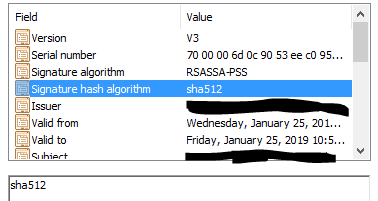
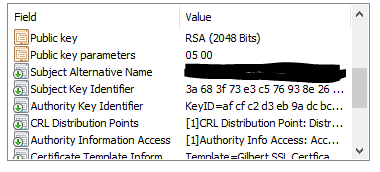
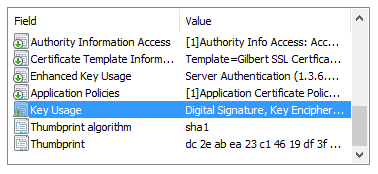
I have uploaded images of the Certificate details from IE.

I think it may be the that the “Thumbprint Algorithm” is sha1?