


How to delete original Personal Address Book folder
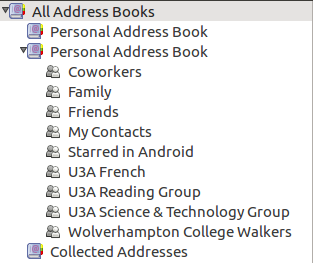
'All Address Books" contains the original Personal Address Book, followed by a Personal Address Book (that I created which contains all my contacts including My Contacts 'folder') and Collected Addresses. If I remember correctly, perhaps erroneously, I moved My Contacts etc from the original Personal Address Book to my created one which is synchronised to Gmail's Contacts. I now want to delete the original Personal Address Book but there is no menu entry to do so. Alternatively, I'd like to move all 'folders' from my created Personal Address Book to the original one.
Todas as respostas (3)

You need to work out which is the original PAB and switch to that. Thunderbird insists on there being a Personal Address Book and a Collected Addresses. If you remove either, it will be silently replaced.
When you know which PAB is which, you can drag and drop from one onto the other's icon. The original one will be associated with a file named abook.mab; your home-made copy will have the same name with a numeric suffix.
But you won't be able to synchronize the genuine PAB to an online address book as It is a purely local address book. Your best bet would be to rename the working address book with a distinctive name and just try to ignore the original PAB. You can rename the real PAB, if that would help, but you'll have to go to the Config Editor to do that. And please try to remember that you have done so and tell us if coming back with address book issues later on.
Alterado por Zenos em
I can get to Config Editor. How do I rename the Personal Address Book?
Type Personal Address Book into its search box. That should show you the entry where it is named, and you can double-click it to edit it. If it doesn't appear, you'll have to create a new string field named ldap_2.servers.pab.description and set its value to whatever name you want to change it to.