


How do I dismiss waiting tabs without opening those webpages
Firefox has a nice feature where any opened links get queued in the background. Occasionally I touch a link that I didn't want to open such as while scrolling through e-mails or an app will try launching an advertisement page which also gets queued. When I later go into the Firefox app, it automatically opens all these queued tabs.
Is there any way to prevent the queued tabs from opening or at least let me choose what to open or dismiss?
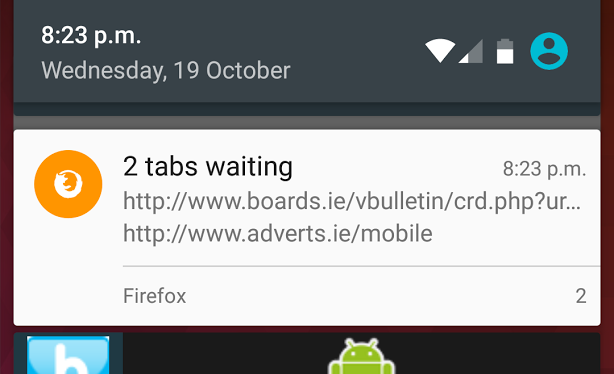
The screenshot shows an example, in this case where I touched two links in an e-mail. Ideally, when I go into Firefox I would like it to show a list of the waiting webpages and touch what I'd like to open or swipe away the ones I don't actually want to view.
Todas as respostas (2)

You can only act on the queued tabs as a group. You can swipe away the notification to dismiss all the queued tabs. Tapping on the notification to load the tabs is the other option.
I don't know of any plans to allow individual loading of the queued items.
I think I found a workaround - Turn off Firefox as the default browser (Settings -> Apps -> Cog wheel -> App links -> Firefox -> Clear defaults)
With the default cleared, if something tries launching a link, I get a 'Open with' screen listing the various web browser apps. So if I get this and did not touch a link (or accidentally touched an ad), I can just touch the back button to dismiss this.
The reason I first requested this is that in Ireland there's a dubious mobile ad provider (which I'll not name) where its pop-up webpages advertise premium rate services. Simply touching the text to accept (which fills the screen) immediately opts the user into receiving a series of premium rate SMSs as the webpage can work out the user from the IP address and probably some other user info forwarded by the source app. So if these pop-ups do not automatically appear (or get queued), it provides an additional step to avoiding accidentally touching one of them.
Alterado por editorsean em