Firefox sync

If Firefox sync does not sync my bookmarks, just history & frequently visited sites, where might the problem be?
Todas as respostas (1)
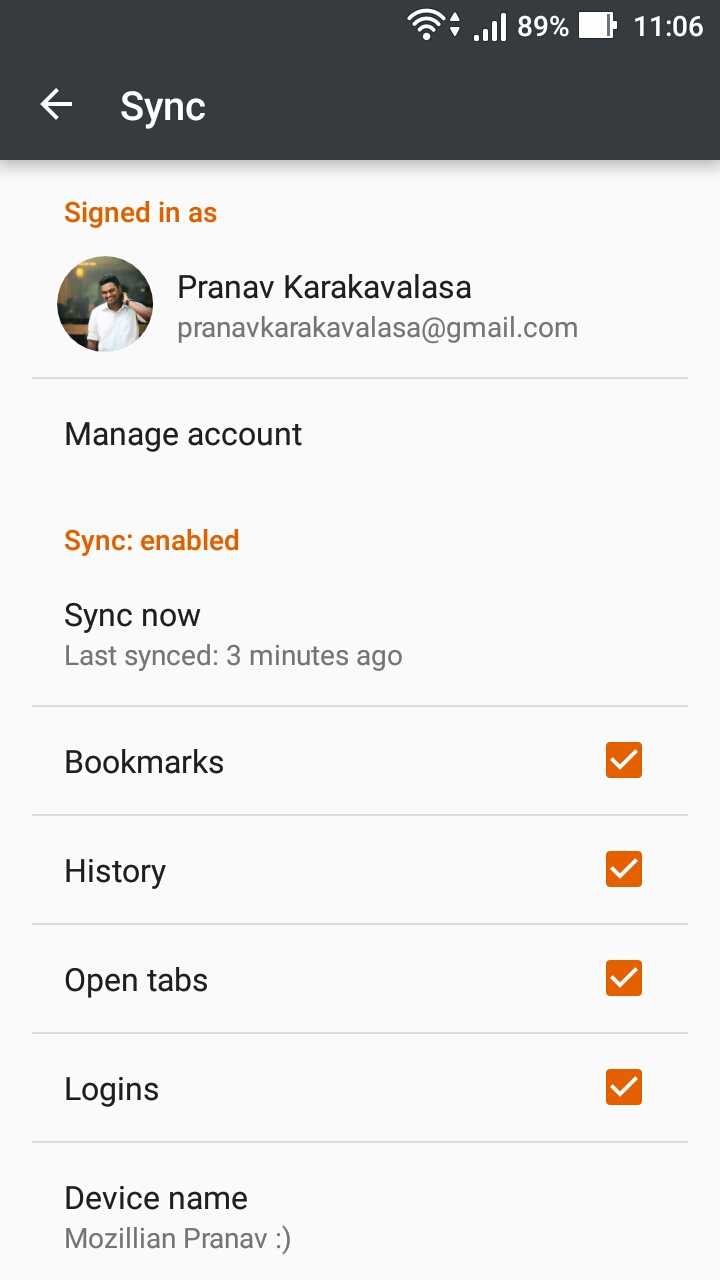
Hello kshiosaki, After signing in to your Firefox account to sync your things, you will see a blue box that says "Sync Preferences". After clicking that you'll be directed to the "Sync" page where you can find all several options to select from. There is a chance that you might have missed to Check the "Bookmarks" box
For a better understanding i will provide you a screenshot of my Firefox Android.
Make sure you also turn on "Auto-Sync" option in your mobile . The possible solution for this is, try logging off and logging in to sync again!
You can do that by Clicking on the Menu button(the three dotted icon on the top right) > Settings > Click on your account.