Windows 10 reached EOS (end of support) on October 14, 2025. If you are on Windows 10, see this article.

Pesquisar no site de suporte

Evite golpes de suporte. Nunca pedimos que você ligue ou envie uma mensagem de texto para um número de telefone, ou compartilhe informações pessoais. Denuncie atividades suspeitas usando a opção “Denunciar abuso”.

Saiba mais
Esta discussão foi arquivada. Faça uma nova pergunta se precisa de ajuda.
Arquivado

ssl signed by removed authority still trusted

sig100

I raise this question because I am worrying about a CA authority WoSign, and now I decide to untrust all SLL certificate signed by WoSign.

Wosign 的 CA有问题,我准备不再信任它签发的证书。


I removed 'Wosign Class 4 EV Server CA G2' from authority list of Firefox, and the next time I review this setting, the authority reappears but all options under this authority (websites, emails , softwares) is unchecked , just as Firefox tech support says.

But when I visit https://www.wosign.com/ , this website still trusted by Firefox. Its certificate is signed by Wosign Class 4 EV Server CA G2, of which I removed the authority.

Can anybody tell me how to make Firefox untrust this CA , and show me alert when I visit any website with SSL certificate signed by Wosign  ? Thank you!

I raise this question because I am worrying about a CA authority WoSign, and now I decide to untrust all SLL certificate signed by WoSign. Wosign 的 CA有问题,我准备不再信任它签发的证书。 I removed 'Wosign Class 4 EV Server CA G2' from authority list of Firefox, and the next time I review this setting, the authority reappears but all options under this authority (websites, emails , softwares) is unchecked , just as Firefox tech support says. But when I visit https://www.wosign.com/ , this website still trusted by Firefox. Its certificate is signed by Wosign Class 4 EV Server CA G2, of which I removed the authority. Can anybody tell me how to make Firefox untrust this CA , and show me alert when I visit any website with SSL certificate signed by Wosign ? Thank you!

Todas as respostas (1)

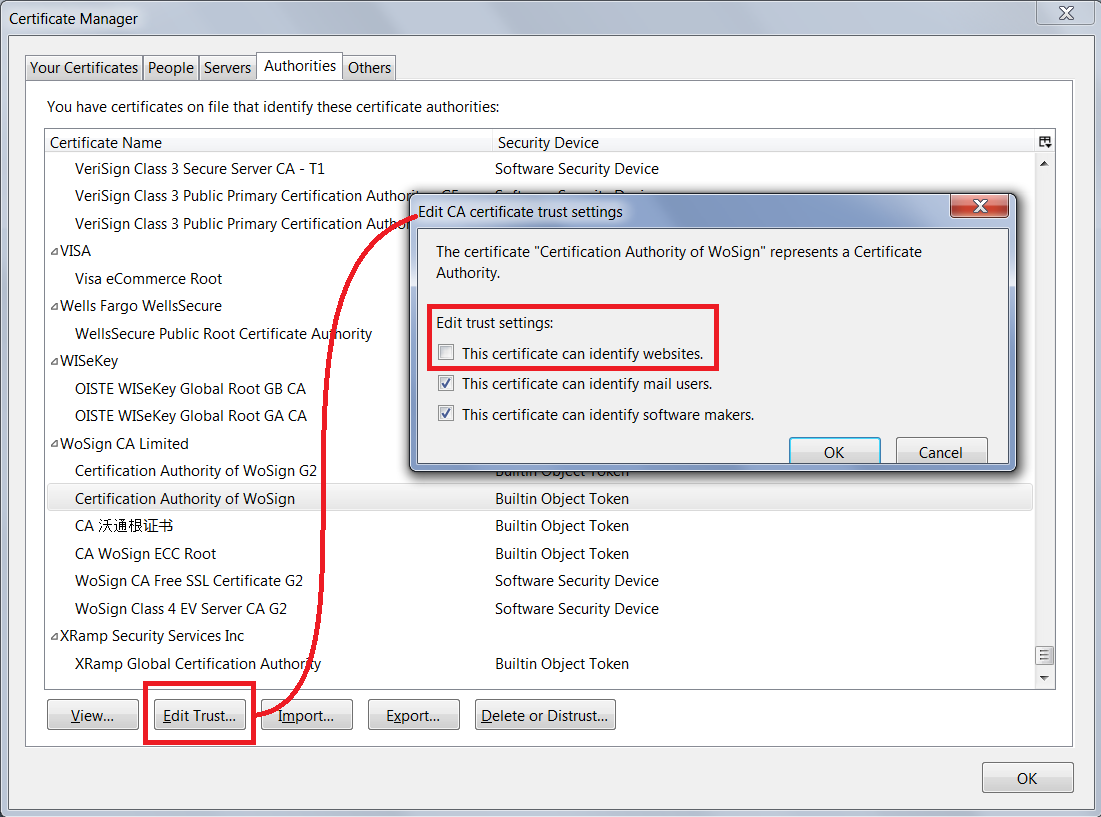
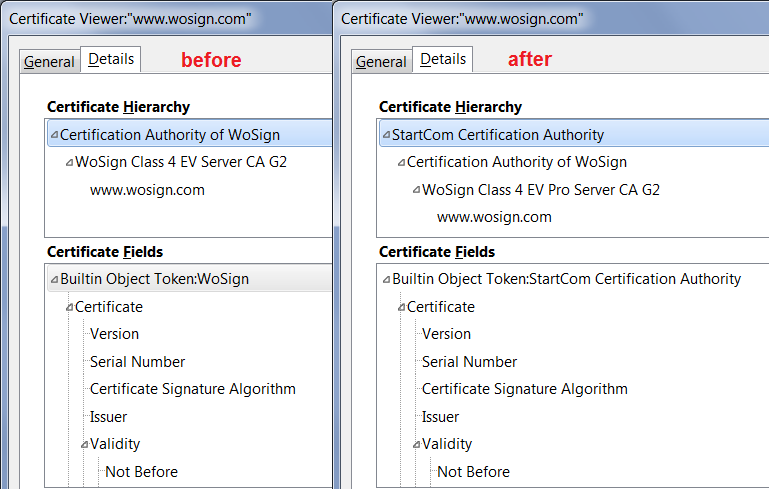
I have to admit I don't really understand how this works. When I remove trust from the root certificate (screen shot #1), then reload the page, instead of not being trusted, there's another authority which is vouching for the untrusted one (screen shot #2). ??!!