


File > Email link... with Gmail causes footer to be suppressed

This is very weird. I have a gmail footer, and I'm logged into gmail in another tab, and when I compose there, the footer shows and sends at the bottom of the message. fine. In Firefox settings under applications, I have mailto set to Gmail. this also works. But, when firefox launches that new email in a new tab, the gmail footer is missing. I can send the email just fine but there's no footer! anyone know why this is? I've searched google with no luck.
Solução escolhida
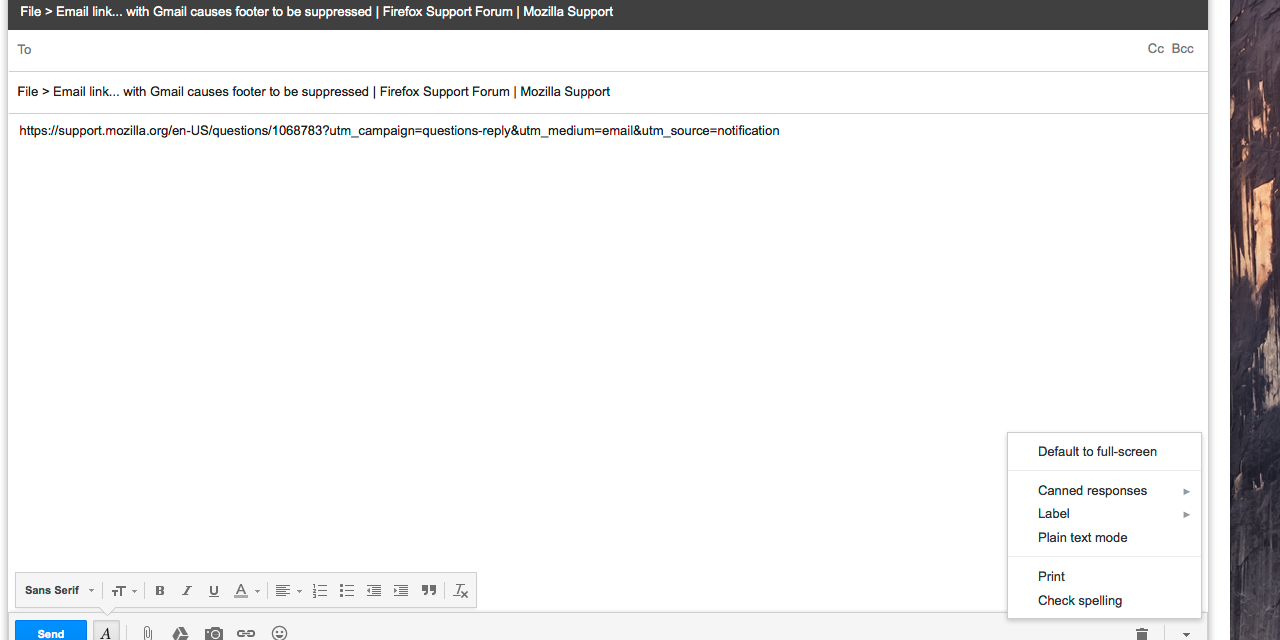
Here is a work around for you. You will need to turn on one of the Gmail Labs called "Canned Responses" and you will need to add your signature to this list. Once enabled this will become available to add to the compose window created from File > Email Link. Direct labs link:
Image of listed canned responses below:
Ler esta resposta 👍 0Todas as respostas (5)
Please check to make sure that the window that you are sending an email from is from the webmail and not a customized mailto link.
Thanks. I don't think I was completely clear. It's not a mailto link I'm trying to use; it's the File > Email link... command from the Firefox menu bar. I often find a page online somewhere and want to email it to someone. I'm logged into gmail in another tab. When I create a new email from within gmail itself, the footer is there. When I choose that menu item in FF, the footer is gone.
The difference between Email Link and a regular email address mailto link is that the Email Link function specifies the content of the message body (body=link). In this situation, Gmail is not adding the signature to the message body. I don't know of any workaround for that since this is controlled by scripts on Google's side.
Solução escolhida
Here is a work around for you. You will need to turn on one of the Gmail Labs called "Canned Responses" and you will need to add your signature to this list. Once enabled this will become available to add to the compose window created from File > Email Link. Direct labs link:
Image of listed canned responses below:
Wow, thanks! This is super cool.