


windows security window popup prevents using passkey saved in password manager
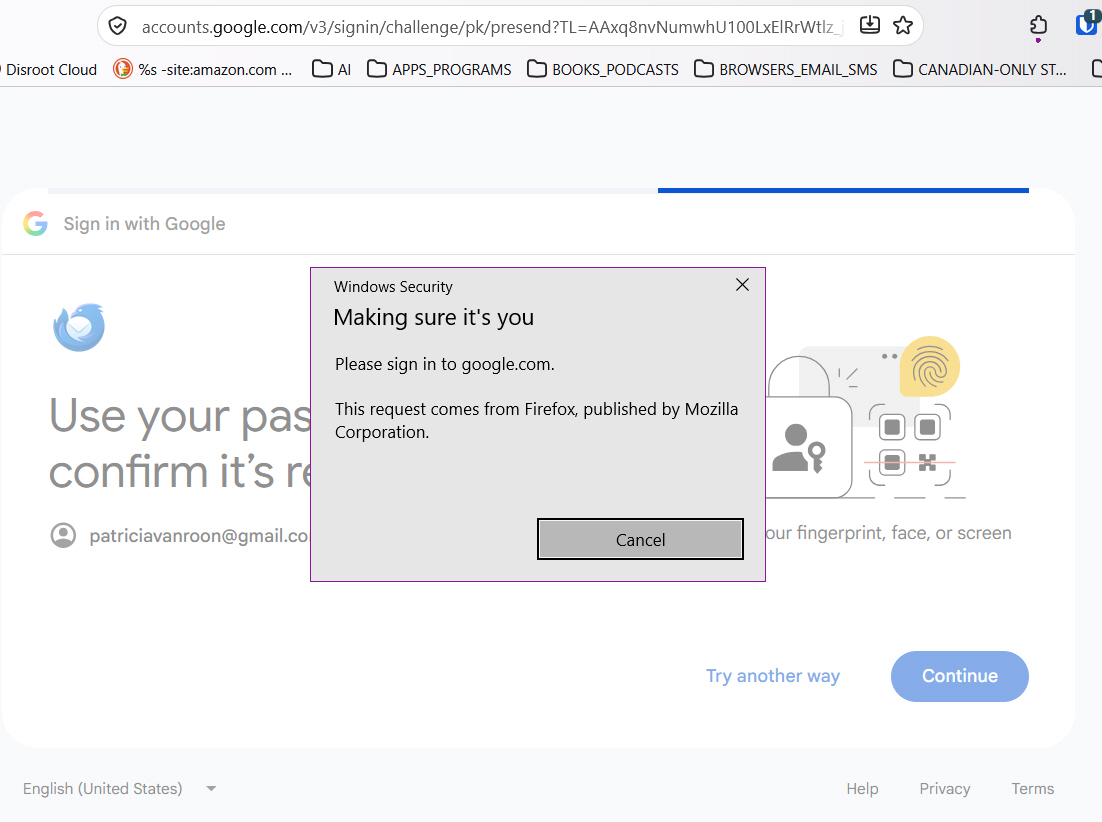
whenever I try to set a passkey in mozilla, the windows security popup appears. I have looked online about turning it off but I cannot find anything. For example, I cannot set my passkey for my gmail account because the popup and gives no other options. When I select 'try another way', all they want is my password so the passkey does not get set.
Wszystkie odpowiedzi (9)
Firefox doesn't store passkeys, it hands off to the device authenticator or key store — in your case Windows Security (or Hello) would handle storing, and later retrieving and authenticating their use.
Understood. So how do I stop this popup?
I'm not sure what authentication your Windows wants from you. Possibly to touch a fingerprint reader?
The popup I pasted into the forum shows what it is. I'm just trying to turn it off so it access the passkey from my password manager instead of giving me this popup. It used to do this but stopped doing it sometime last week. I hadn't changed anything on my computer so I was a bit confused when this started.
Right, but normally it looks like this: support.mozilla.org/questions/1595347 — prompting to either unlock a USB token, authenticate to the device's Windows Hello, or provide cross–device authentication with a QR code etc. … your system prompt lacks any detail as to what it expects you to do. (Perhaps you'd find answers around some Microsoft support surfaces, as this sounds like something changed in your Windows handling these requests?)
Thank you for the reply. Sadly, it doesn't solve the problem. The popup says that it is coming from Mozilla and I checked whether it is a Mozilla or Microsoft issue, I was informed it was a Mozilla issue. I'm not sure if it is or not but I don't want to be running back and forth between Mozilla and Microsoft trying to resolve a problem they both seem to have.
Firefox only hands off the authentication requests from the sites to the system (OS–level security layer, a wallet, a key store or whatever credential provider is being presented as the default on the system) — so the dialog that you see, titled "Windows Security", and its content, is coming from Microsoft's services.
You mentioned having a password manager, so perhaps check with their support in case they're aware of any recent integration issues with Windows Security — maybe the dialog is waiting for an unlock of your third party store — can't tell, as this is all external to Firefox really.

One thing worth checking is whether your password manager is still properly registered as the passkey provider in Firefox. If it was working before and suddenly started showing Windows Security instead, a recent update to Firefox or your password manager might have changed how passkey requests are handled.
I would check the password manager's browser extension settings and make sure passkey integration is enabled. Also, if you have the desktop app installed, make sure it is running and unlocked.
Which password manager are you using? Bitwarden, 1Password, or something else? That might help narrow down why Firefox is opening Windows Security instead of offering your saved passkeys.
Hopefully this helps point you in the right direction. 🔑
It might be the Bitwarden password manager. They just informed me they are not supporting Windows 10 anymore. I have a new one and I'm just trying to get it set up. Thanks for the information and the help. You were great!