


Bug Firefox 158 always saving active session data across browser restarts

I am using FF 158 on Win11
I noticed that apps after login are being restored with my previous session even if i close the browser and restart the browser!
ways to reproduce the problem: - Login to an app - Exit the browser, ensure the Firefox.exe is not running using Task Manager - Restart the browser and go to the same app URL. - At this point I expect the app to prompt for a password again (It does prompt for a login on Chrome and other browsers including FF 154) however on FF 158 the session is still active!
I have checked the settings in FF 158 and disabled the restore Tabs option on startup however the bug still exists.
This is a serious security issue. Kindly investigate and address
Regards Sanjay
Wszystkie odpowiedzi (4)

Hi Sanjay!
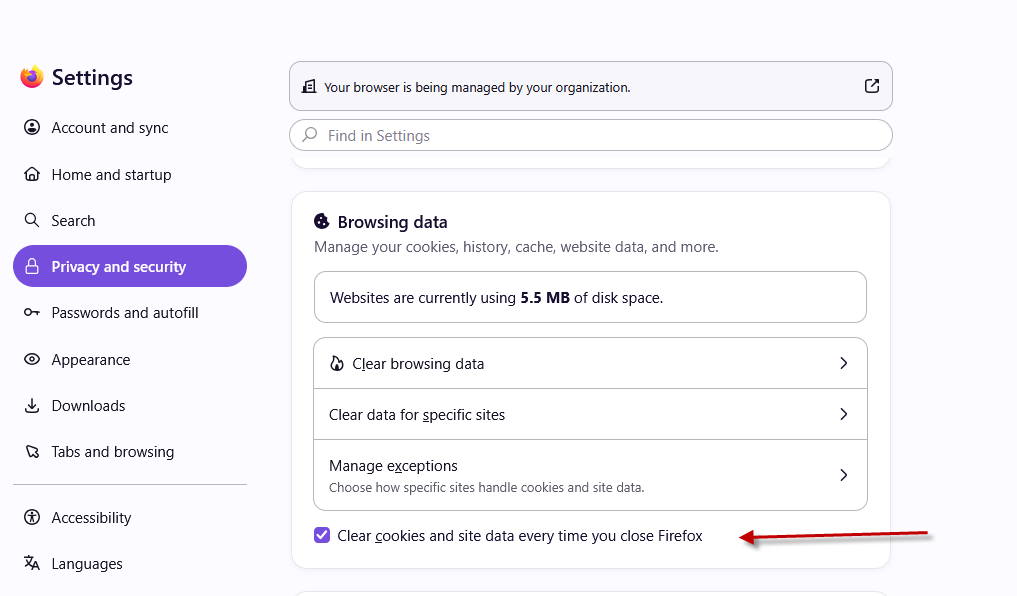
I think, that unless you are clearing cookies when the browser closes, this is the intended behaviour. Check your Settings → Privacy and security → Browsing data section, is Clear cookies and site data every time you close Firefox selected? Maybe it was before, but it isn't now?
Regards, Balázs
Dear Balazs
Thank you for the prompt answer.
Selecting that checkbox resolves the issue! Not sure how it got unselected
Many thanks
Regards Sanjay
Der Balazs
I spoke too soon. That setting clears ALL cookies etc. That is not the behavior I want or existed in the previous versions of FF.
session data should be cleared when a browser exits.
In FF 158 that does not happen unless that checkbox is enabled.
In FF 154 and other browsers like Chrome it works as expected. The session data is cleared and you have to login again.
I believe this is a bug in FF 158
Regards Sanjay
How do you tell whether a cookie is from the ones you'd like to keep (so not "all cookies" according to "not the behavior I want") or specifically those you'd prefer to clear, being a session cookie but not time–stamped perhaps? Do you mean by the expiration being set per standards (which, doesn't exactly define when should a session get thrown away, but customary on shutdown yes) — i.e. the difference driven by explicit cookie storage length when set by the site? Or you have some other definition in mind?
Do you have a test example which values you set and it is kept in v154 but not in v158 using the same settings?
If you feel there's a behavioral change for the same site at this point in time just based on Firefox version, could you run mozregression over your use–case to help confirm there's reliably "good" vs. reliably "bad" versions on both sides to help narrow down when and what changed the results for the sites you have in mind? Thanks!