


you are blocking an OK site , saying the ssl is expired...
you are blocking "entry.ostralia.cc" saying the ssl is expired....
BUT SSLCHECKER link text shows it's OK ! and all other browsers allow it...
you could at least allow me to access it under the 'advanced' option like in earlier days...
( the Host provider has mixed up billing for the 3 SSLs on my site , but all 3 are active and valid SSLs...)
Zmodyfikowany przez James w dniu
Wszystkie odpowiedzi (8)
thanks for your response jbr ; much appreciated.
SSL is incomprehensible, far too complicated. Maybe that's part of the Security :)
I see your tools say it's REVOKED but, the checker provided from my host says it OK! and Edge, Duckduck , Brave say OK... https://decoder.link/sslchecker/entry.ostralia.cc/443
so, I paid my fees , the Host checker says OK and now > 'blah' how might I get past this ? ( hint, maybe reinstate the option to bypass the warning as it was in older versions of Firefox )
regards jxp
Zmodyfikowany przez James w dniu
The other web browsers you mentioned are built on Chromium. Based on doing support for a long time it always seems like they may not inform you of secure site issues like with certificates not be trusted and such for say a week while the Firefox web browsers informs you right away in comparison.
Bonjour
A similar discussion thread https://support.mozilla.org/en-US/questions/1609803
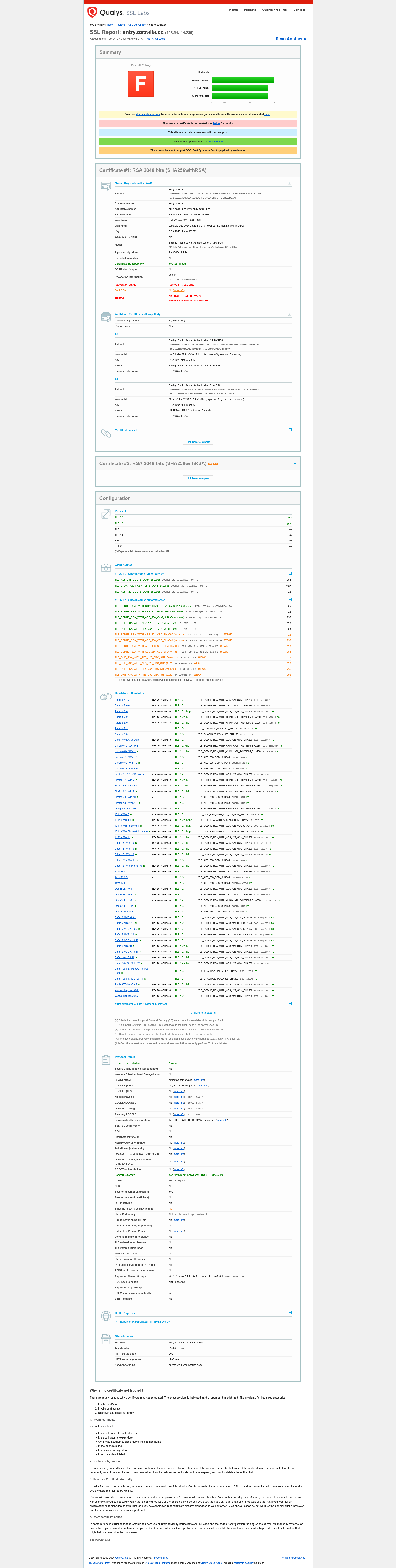
Below, SSL Report: https://www.ssllabs.com/ssltest/analyze.html?d=entry.ostralia.cc Overall Rating F, Revocation status Revoked INSECURE, at instant analyze.
Zmodyfikowany przez Agent virtuel w dniu
You'll need to liaise with whoever you're paying for the certs to sort this out really. The issuer (Sectigo) revoked these and published their revocation status globally. You can't use them any longer. You'll need to get new ones installed and served. If you're paying someone to "sort this out", they're not sorting it out.
Unless you have a very specific need I'd recommend skipping similar complicated commercial offerings and instead just set up the hosts to get a free letsencrypt.org (which Mozilla was a founding partner of).
Thanks you all for your responses - very helpful!
It seems my SSLCHECKER ignores the REVOKED INSECURE status. It also seems the Issuer of the Certificate is randomly REVOKING and declaring it INSECURE (just for fun ?! ). The Certificate clearly has 2 months validity remaining..! Not Impressed :(
Anyway , I still need to find where I can add this status to my exceptions in Firefox , I'm sure I found a place to do that for a domain this NO Certificate at all , which can't be worse than a valid certificate being randomly revoked ?? I also need to educate myself on letsencrypt.org :) .
again , Thank You !
Hello,
I am glad to hear that your problem has been resolved. If you haven't already, please select the answer that solves the problem. This will help other users with similar problems find the solution.
Thank you for contacting Mozilla Support.
Revoked certificates can't be trusted again. There's no exception in the browser, besides tampering with the internals, blanking out any certificate status updates (endpoints and stored payloads) and the data pulled from the authorities live, and going back to just the last data shipped with the browser that would be few weeks older than these real–time checks etc. … not something user–serviceable per se, but achievable if you read up on the standards to be able to mock or blank out the results (I, for one, personally can't tell if an invalid/intercepted/wallpapered response could be ignored, or it will be automatically treated as failing check etc.)
Revocation is a deliberate step. It means explicit positive documenting of distrust for the logged serial… not just a temporary status of not being in good standing or something similar. If your service provider triggered it, they should be able to assist you with obtaining a new one and loading it into the service. (If you want to work around the issue, you need to remove the cert from the server response and put e.g. a default wildcard "wrong host" of the vendor, or the machine "self–signed" ones there instead, and you can add these as exceptions locally then. They're not trusted, but they're also not explicitly distrusted globally.)
Again, for further details, you need to reach to the parties you're contracting with — they should be able to tell why the revocations, on what grounds, what status it got assigned etc., if that was their manual action, or an automated request to their vendor… etc. The action was intentional, from some of the parties involved in your certificate procurement or management.