


how to update my Fire Fox and stop errors and slow downs

I would like to speed up my Fire Fox and update my Fire Fox to the latest version for my computer. I would also like to stop the errors and slow downs and the message telling me that the internet is telling me that the site is not working or slowing down my internet and i should close my internet.
Wszystkie odpowiedzi (1)
You have the latest version, but it looks like your extensions are slowing you down.
Try Firefox Troubleshoot Mode to see if the problem goes away. Firefox Troubleshoot Mode is a special diagnostic mode that temporarily turns off hardware acceleration, disables add-ons (extensions and themes) and resets some settings. See the Use Troubleshoot Mode in Firefox article for details.
If Firefox is open, you can restart in Firefox Troubleshoot Mode from the Help menu:
- Click the menu button
 , click Help, select Troubleshoot Mode and click Restart in the "Restart Firefox in Troubleshoot Mode?" dialog that opens.
When the Firefox Troubleshoot Mode window appears, select "Open".
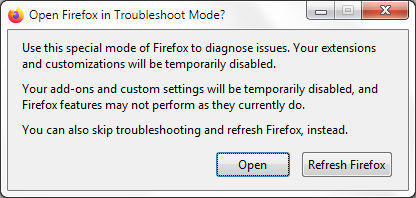
If the issue is not present in Firefox Troubleshoot Mode, your problem is probably caused by an extension, theme or hardware acceleration. Please follow the steps in the Troubleshoot extensions, themes and hardware acceleration issues to solve common Firefox problems article to find the cause.
To exit Firefox Troubleshoot Mode, just close Firefox and wait a few seconds before opening Firefox for normal use again. (If you can't exit Firefox Troubleshoot Mode, please see Firefox is stuck in Troubleshoot Mode).
When you figure out what's causing your issues, please let us know. It might help others with the same problem.