


Windows 10 reached EOS (end of support) on October 14, 2025. If you are on Windows 10, see this article.

Przeszukaj pomoc

Unikaj oszustw związanych z pomocą.Nigdy nie będziemy prosić Cię o dzwonienie na numer telefonu, wysyłanie SMS-ów ani o udostępnianie danych osobowych. Zgłoś podejrzaną aktywność, korzystając z opcji „Zgłoś nadużycie”.

Więcej informacji
Wątek został zarchiwizowany. Jeśli potrzebujesz pomocy, zadaj nowe pytanie.
Rozwiązane Zarchiwizowany

Cannot sign into Microsoft org account that requires 2FA

Linas

I can log in and fill in the password, but upon trying to log in, at the end it says "Authentication error. Unable to log in at server. Probably wrong configuration, username or password" I believe this is because the org I'm in requires 2FA for all logins and I can't actually 2FA the login. Thunderbird automatically closes the window that I would use to log into the account and authenticate the connection a few seconds after it appears

I can log in and fill in the password, but upon trying to log in, at the end it says "Authentication error. Unable to log in at server. Probably wrong configuration, username or password" I believe this is because the org I'm in requires 2FA for all logins and I can't actually 2FA the login. Thunderbird automatically closes the window that I would use to log into the account and authenticate the connection a few seconds after it appears

Wszystkie odpowiedzi (3)

Wybrane rozwiązanie

You must use oauth authentication when you set up your account in Thunderbird.
Matt said

You must use oauth authentication when you set up your account in Thunderbird.

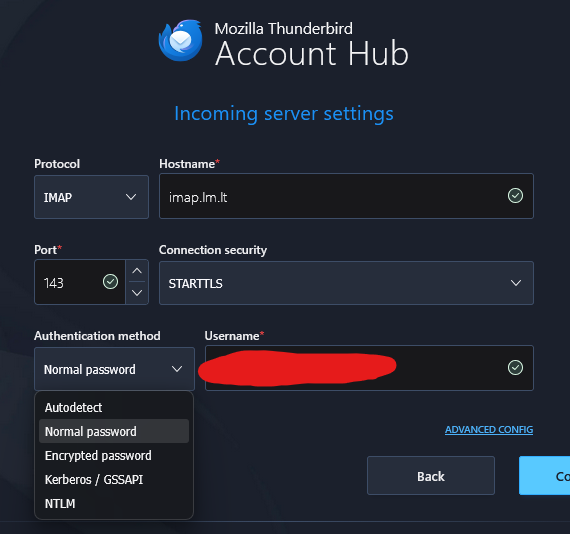
Sorry, I should've been more clear. The server I would connect to is lm.lt, not directly to Microsoft, and as far as I can tell, there's no oauth option present with my current options

Fixed it, apparently solution was to just use the following settings: Incoming: Protocol IMAP Hostname outlook.office365.com Port 993 Connection security SSL/TLS Authentication method OAuth2 And have the username be my edu email Outgoing: Protocol SMTP Hostname smtp.office365.com Port 587 Connection security STARTTLS Authentication method OAuth2 And same as before, username is edu email

Hope this helps anyone else having the same information