


Windows Integrated authentication (NTLM) not working on Firefox

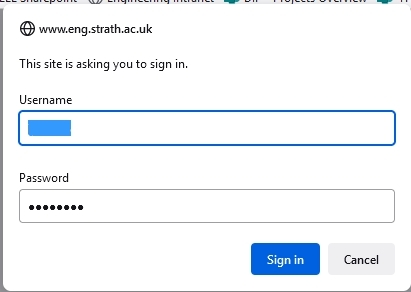
I am a member of teaching staff at a university in the UK. Most sites we common sign-in via SSO but some sites have different sign-in methods. I am no expert on any of this, merely a user. 2 particular sites I need access to have failed to let me in in recent months. They generate a pop-up (see enclosed window-shot) asking me for my username and password and then keep coming up with the same pop-up. Both sites work with Chrome on my laptop and Opera on my phone. Our systems team have relayed me the following explanation:
“The latest versions of Firefox aren’t compatible with the “Extended Protection” for Windows Integrated authentication (NTLM) security setting that we have set on the Faculty Intranet…
The reason for using extended protection is that it enhances the existing Windows Authentication functionality to mitigate authentication relay or "man in the middle" attacks. This setting has been in place since the tail end of last year…”
I don't want to have to use Chrome, can't use Edge as this is a Windows 8.1 machine. Any chance of solving this?
Zmodyfikowany przez julian.feuchtwang w dniu
Wszystkie odpowiedzi (1)

Make sure you are not blocking content.
https://support.mozilla.org/en-US/kb/enhanced-tracking-protection-firefox-desktop also see https://blog.mozilla.org/security/2021/03/23/introducing-smartblock/
https://support.mozilla.org/en-US/kb/smartblock-enhanced-tracking-protection
Diagnose Firefox issues using Troubleshoot(Safe) Mode {web link}
A small dialog should appear. Click Start In Troubleshoot(Safe) Mode (not Refresh). Is the problem still there?
Many site issues can be caused by corrupt cookies or cache.
Warning ! ! This will log you out of sites you're logged in to. You may also lose any settings for that website.
- How to clear the Firefox cache {web link}