


Windows 10 reached EOS (end of support) on October 14, 2025. If you are on Windows 10, see this article.

Przeszukaj pomoc

Unikaj oszustw związanych z pomocą.Nigdy nie będziemy prosić Cię o dzwonienie na numer telefonu, wysyłanie SMS-ów ani o udostępnianie danych osobowych. Zgłoś podejrzaną aktywność, korzystając z opcji „Zgłoś nadużycie”.

Więcej informacji
Wątek został zarchiwizowany. Jeśli potrzebujesz pomocy, zadaj nowe pytanie.
Zarchiwizowany

Cannot navigate to areas of an extension that go beyond my screen resolution

cor-el odpowiedziano
smoke

Hi there, I have a laptop with a fresh Debian install which includes Firefox ESR but I have encountered a bug that I cannot get past.

I guess to put it simply - I cannot browse to necessary areas of an extension that have a menu larger than my where my screen cuts off.. Please see this picture I have attached: https://imgur.com/OzMhWue

In this picture, there is options and buttons I need to select to proceed that are below where the screen cuts off. I have not found any way to shrink this, nor navigate to the missing area. Clicking the scroll icon only scrolls the background website but NOT the menus itself. I am encountering the problem with all major extensions including Lastpass and Metamask - so I assume this hopefully has a solution!
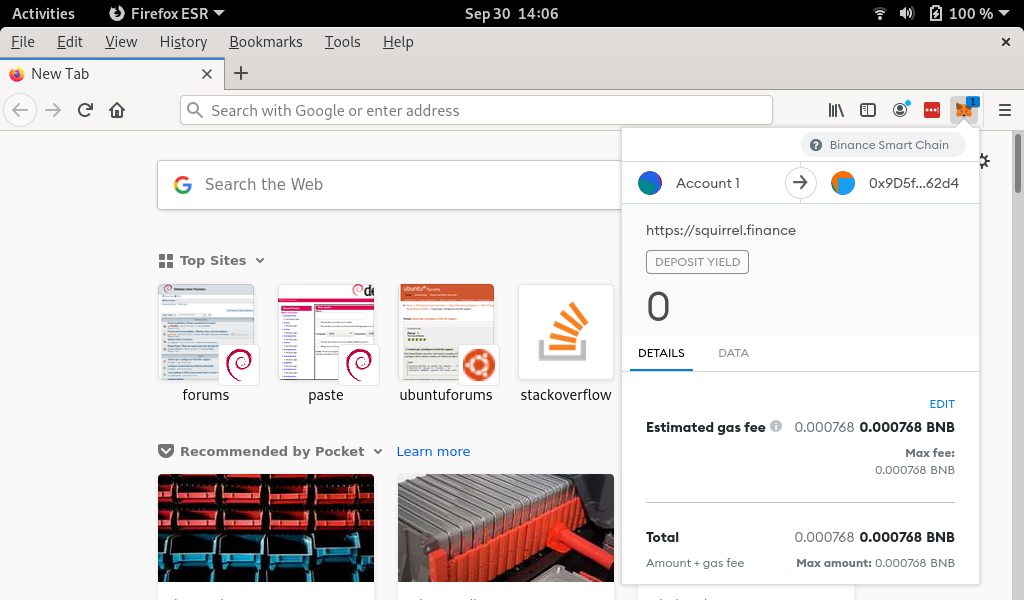
Hi there, I have a laptop with a fresh Debian install which includes Firefox ESR but I have encountered a bug that I cannot get past. I guess to put it simply - I cannot browse to necessary areas of an extension that have a menu larger than my where my screen cuts off.. Please see this picture I have attached: https://imgur.com/OzMhWue In this picture, there is options and buttons I need to select to proceed that are below where the screen cuts off. I have not found any way to shrink this, nor navigate to the missing area. Clicking the scroll icon only scrolls the background website but NOT the menus itself. I am encountering the problem with all major extensions including Lastpass and Metamask - so I assume this hopefully has a solution!
Załączone zrzuty ekranu

Wszystkie odpowiedzi (1)

I assume that you meet the requirements for the current release, so maybe try the current 92.0.1 release.

You can find the full installer of the current Firefox release (92.0.1) in all languages and all operating systems here: