


screenshot missing since WIN 10 20H2 update yesterday
screenshot option is missing since WIN 10 20H2 update yesterday
Tried toggling true/false screenshot settings in about:config with close & reopen firefox inbetween
Wszystkie odpowiedzi (5)

hello crm,
as you have windows 10, then you have a fully functional and enhanced screen capturing feature.
so if had existed in FF previously, then I think it was duplicating what windows already provides.
see attached pic.
if you features are set up correctly, you will have an icon of a pen near the clock.
this applications lets you capture screen shots.
you also have an additional windows feature/app called "snipping tool"
Wybrane rozwiązanie
crmjhn said
screenshot option is missing since WIN 10 20H2 update yesterday Tried toggling true/false screenshot settings in about:config with close & reopen firefox inbetween
Thank you for checking that it is enabled.
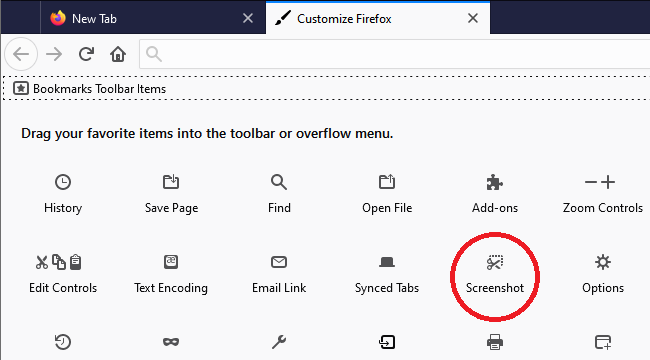
Sorry for the non-obvious change, but in Firefox 88, Firefox Screenshot stopped being a "Page Action" that you could access from the ••• menu in the address bar. It now has an optional toolbar button ("Browser Action") in addition to right-click context menu integration and the keyboard shortcut (Ctrl+Shift+S).
More info on where to find that toolbar button in the Customize tab:

Thank you jscher - found it in right click - so relieved the feature is still available
i have this problem too but i cant find the screenshot option in the toolbar as shown here ): pls hlp i need my screenshotties