


URGENT! TBird keeps asking for my Password??? I can't get my mail. Windows 10
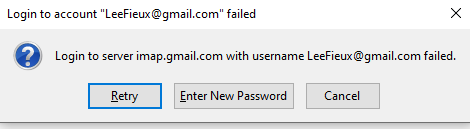
Before dinner Wed nite (EST), I could check my GMAIL emails (imap.gmail.com) just fine. After dinner (must've been something I ate?), TBird now keeps asking me for my password when I try to 'Get Messages' or 'Send Messages'. When I put in the correct password, it doesn't accept it. I have checked the CAPS lock key, too. I even tried an old password. When I load up TBird for the first time, it asks me for a password?
The 'good' password works to get me into Gmail online, so I can view all of my Gmail Emails, but TBird is so much better or course. I can use the GMAIL app for my IPad and everything is fine, so at least I can see my messages.
I CHANGED NOTHING!!! The Passwords show in my password manager.
As an aside: Before all of this happened, I had been noticing that, since updating to the newest TBird, everything is super super slow. When I would type something it'd take 3-5 seconds to show. Plus, it now takes 'forever' to load up.
Thx.
Zmodyfikowany przez Lee Young w dniu
Wszystkie odpowiedzi (3)
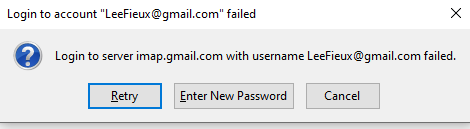
Before dinner Wed nite (EST), I could check my GMAIL emails (imap.gmail.com) just fine. After dinner (must've been something I ate?), TBird now keeps asking me for my password when I try to 'Get Messages' or 'Send Messages'. When I put in the correct password, it doesn't accept it. I have checked the CAPS lock key, too. I even tried an old password.
The 'good' password works to get me into Gmail online, so I can view all of my Gmail Emails, but TBird is so much better or course. I can use the GMAIL app for my IPad and everything is fine, so at least I can see my messages.
I CHANGED NOTHING!!! The Passwords show in my password manager.
As an aside: Before all of this happened, I had been noticing that, since updating to the newest TBird, everything is super super slow. When I would type something it'd take 3-5 seconds to show. Plus, it now takes 'forever' to load up.
Thx.
edited
Zmodyfikowany przez Toad-Hall w dniu
User keeps posting same question - so if anyone can help, please post responses in this location: https://support.mozilla.org/en-US/questions/1302749