

Wątek został zarchiwizowany.
Jeśli potrzebujesz pomocy, zadaj nowe pytanie.

Zarchiwizowany
password and login autofill
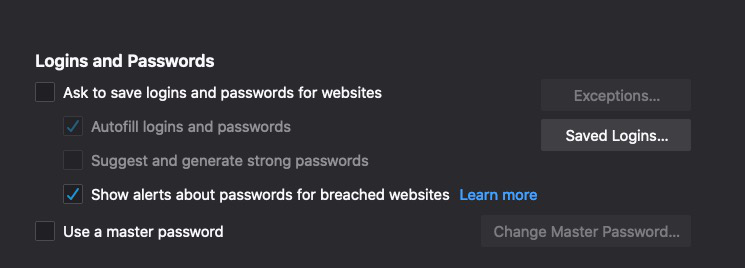
Just recently, Firefox stopped auto-filling my logins and passwords on the websites I visit. Check my privacy and security preferences, and noticed the box was unchecked for "ask to save logins and passwords for websites" so I checked it. But it won't save. Every time I close the browser, the preference reverts back. There is no "save" option after I check the box either.
Just recently, Firefox stopped auto-filling my logins and passwords on the websites I visit. Check my privacy and security preferences, and noticed the box was unchecked for "ask to save logins and passwords for websites" so I checked it. But it won't save. Every time I close the browser, the preference reverts back. There is no "save" option after I check the box either.
Wszystkie odpowiedzi (1)
Make sure you do not run Firefox in permanent Private Browsing mode (Always use Private Browsing mode; Never Remember History).
- https://support.mozilla.org/en-US/kb/private-browsing-use-firefox-without-history
- https://support.mozilla.org/en-US/kb/common-myths-about-private-browsing
- Options/Preferences -> Privacy & Security
Firefox will: "Use custom settings for history" - remove checkmark: [ ] "Always use Private Browsing mode"