


When will Thunderbird stop making automatic updates thereby allowing us to update after addons have updated for the new version? Guys this is a major problem.

The 68.4.1 update just wiped out all my addons. Even the simplest settings like font size and colors are gone. I've got to be able to choose to update a month after the update is released and the add-on folks have time to adapt their addons.
Wybrane rozwiązanie
For the Folder Pane and Threads Pane, here is some css:
@namespace url("http://www.mozilla.org/keymaster/gatekeeper/there.is.only.xul");

/* pane background color */
#folderTree,
#threadTree
{
  background-color: #D3D3D3 !important;
  color: black !important;
}

/* Folder Pane font */
#folderTree > treechildren {
  font-size: 12pt !important;
  font-family: Verdana !important;
}

/*  Threads Pane font */
.tree-rows {
    font-size: 12pt !important;
    font-family: Verdana !important;
}
Create a subfolder of the profile folder, name it chrome, create a new text file in chrome and save it as userChrome.css, Save as Type: All Files *.*, copy the above content into the css file.
Przeczytaj tę odpowiedź w całym kontekście 👍 0Wszystkie odpowiedzi (6)
you do realize that the development "train" is a period of rolling 4 week intervals and that addon developers get about a year for most changes to affect Thunderbird as there is only one release a year? Why would they need another month if they have not managed it on the 12 they already had?
The development team try to limit addon breaking changes in the last half of the development cycle so you are asking for another month for people that failed time management really. But 68.4.1 made no changes that would affect addons. The last major change was 68.0
All I know is that my Thunderbird updated to 68.4.1 and the colors, font size, etc.. switched to default. The Theme is disabled as incompatible. Yes, it happened with the 68.0 update but I expected that. I did not expect that when updating to a decimal update from 68.3.0 to 68.4.1. And rest assured, it did affect addons. From this point on, I won't approve updates until I have time to cope with a too small typeface and blue. It's just one more minor frustration among thousands experienced by an old guy who started coding in 1970.
Maybe you could be more specific, as many issues to do with add-ons, fonts and colors have been answered in this forum. Which add-ons? There are over 200 68-compatible add-ons, not counting dictionaries.
Fonts and colors of what? TB doesn't update automatically unless you set it in Options/Advanced/Update.
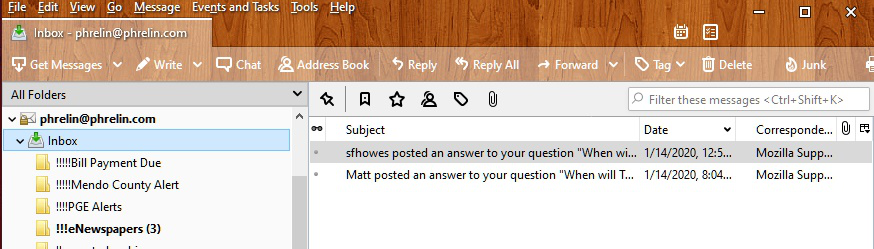
OK. I've found ways in 68.4.1 to change the font size, color, background color, on everything but the opening screen (All Folders) - image attached. Thunderbird is pretty useless to me if I can't easily see the email folder and message listings. It seems like these are basic things that a user should be able to control, so maybe I'm missing some setting?
Wybrane rozwiązanie
For the Folder Pane and Threads Pane, here is some css:
@namespace url("http://www.mozilla.org/keymaster/gatekeeper/there.is.only.xul");

/* pane background color */
#folderTree,
#threadTree
{
  background-color: #D3D3D3 !important;
  color: black !important;
}

/* Folder Pane font */
#folderTree > treechildren {
  font-size: 12pt !important;
  font-family: Verdana !important;
}

/*  Threads Pane font */
.tree-rows {
    font-size: 12pt !important;
    font-family: Verdana !important;
}
Create a subfolder of the profile folder, name it chrome, create a new text file in chrome and save it as userChrome.css, Save as Type: All Files *.*, copy the above content into the css file.
Thank you. That css solved my problem.